
Water/Methanol Injection and Nitrous
Control a compatible water/meth pump, monitor an existing WMI controller, or build progressive nitrous control around your installed sensors. Set the outputs, measurements, curves and protections in the app; FusionDrive saves the configuration and runs it in the car without a connected phone.
Configure with injection disabled and test with instrumented dummy loads before using fluid or nitrous. The controller can act on installed, calibrated measurements; it cannot measure an empty tank, blocked nozzle, fuel pressure or mixture without the relevant signal. Match each pump, solenoid or external control input to the output's polarity, current and PWM requirements. See Wiring before connecting a load.
Water/methanol injection (WMI)
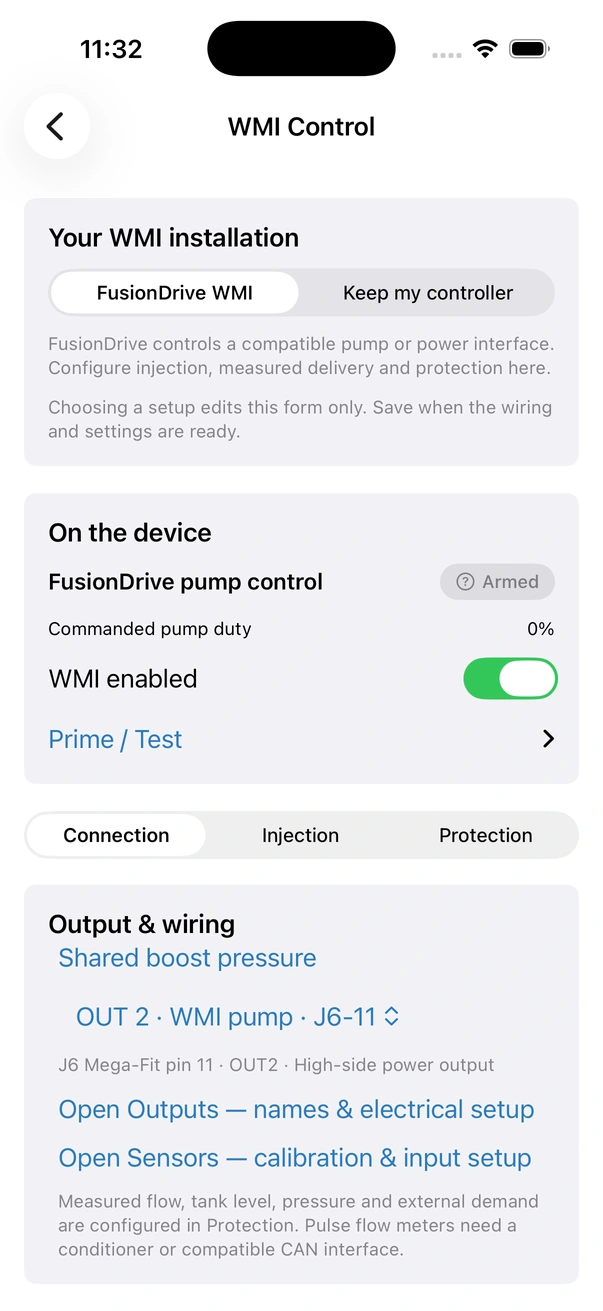
Open More → WMI Control. Under Your WMI installation, choose FusionDrive WMI or Keep my controller. For a retained controller, choose Monitor only or Enable interlock. This edits the form; it changes the device only when saved.
| Controller role | What FusionDrive does | What you connect |
|---|---|---|
| FusionDrive WMI | Commands pump duty using a linear boost ramp or an editable boost/duty table. | A compatible pump output, plus the measurements you want to use for protection. |
| Keep my controller → Monitor only | Reads external demand and measurements. Owns no output; configured linked boost protection can still act. | The existing controller's supported demand signal and any installed flow, pressure or level measurements. |
| Keep my controller → Enable interlock | Monitors the external system and operates a binary permit output: 100% permits operation; 0% removes permission. | A compatible enable/interlock input on the external controller. This output is not the external pump's PWM signal. |
External-controller modes require a fresh demand source. They do not change a third-party controller's own maps or implement its proprietary communications. Pulse-output flow meters need a compatible voltage conditioner or CAN interface; IN1–IN6 do not count high-frequency pulses.
WMI setup
- Configure the measurements first
Add and calibrate sensors under Sensors, or define the required vehicle/accessory CAN signals. Check actual values, units, switch polarity and what happens when a signal disappears.
- Choose the controller role
Use pump control for a pump FusionDrive drives, monitor only to observe an existing controller, or enable interlock for a documented external permit interface.
- Allocate the output
Pump and interlock modes need an available output set to Auto. Monitor-only mode needs no output. OUT1–4 are high-side outputs; AUX1/2 are low-side sinks. Use a compatible load or interface, not an arbitrary spare pin.
- Set demand and protection
For pump control, set the boost ramp or table. Bind flow, pressure and tank level where fitted; select external demand in external-controller modes. Set thresholds, input age, grace and recovery timing.
- Save and read back
Tap Save WMI Settings, wait for the device response, then use Reload saved values to inspect the stored configuration. Save includes all WMI sections. Monitor-only saves release the WMI output and disable WMI; enable monitoring when ready. If the device configuration changed while you were editing, reload and review before saving again.
- Test, then enable
Check output operation, simulated low/stale measurements, fault recovery and linked boost response before enabling injection. Test pump priming with fluid safely diverted away from the engine.
WMI Status
WMI Status shows the saved controller role and state, matching ring gauges for commanded duty or external demand, measured flow and line pressure, and the WMI enabled switch. Unconfigured measurements display a dash rather than zero. Fault reasons and Clear WMI Fault appear when needed. In Protection → Measured delivery & protection, inspect flow, line pressure, tank level, external demand where applicable, active grace and recovery readiness.
Measured flow within configured limits means the configured flow signal passes its checks. Delivery unverified means that evidence is unavailable or not established. Neither pump duty nor a pressure or level reading alone proves fluid reached the nozzle.
WMI enabled
WMI enabled controls the saved setup and enables the selected role. Pump control can inject when its demand and protection conditions are met. External modes monitor their configured demand; interlock mode also controls the permit output. Switching the system off stops FusionDrive pump/permit commands and cancels priming.
If enable is rejected, read the message and check the assigned output, Auto mode, source availability and active faults. Do not treat a rejected toggle as an applied setting.
Prime / Test
Prime is available for the saved, enabled FusionDrive pump control setup. Expand WMI Status → Prime / Test, choose a duration from 500 to 30,000 ms in 500 ms steps and a duty from 0 to 100%, then tap Start Prime. While priming, use Stop Prime. Saved defaults are in Control → Response & prime defaults.
Priming is a temporary command, not a saved instruction to prime on every reboot. Measurement protections still apply. Prime grace delays minimum flow/pressure checks only; missing signals, tank-level and upper-limit checks remain active. Divert fluid safely during setup and verify actual delivery.
Control: pump progression
WMI pump progression uses the configured shared boost-pressure source, even when Fusion Boost actuation is disabled. Open WMI Control → Setup → Shared boost pressure. Select the intended onboard, analog, OBD or decoded CAN pressure source supported by the app, verify gauge-pressure units and freshness against a reference, then use Save shared pressure source and Reload saved source. This changes only the shared measurement selection; it does not enable either controller or prepare an output. Flow, line pressure, tank level and external-demand bindings in WMI Protection serve different roles; they do not choose pump boost demand. Prove missing or stale pressure prevents injection before tuning the curve.
In pump control, Start Injection sets the start pressure and Full Injection sets the pressure for maximum duty in Linear ramp mode. Pressure sliders and numeric fields use your preferred pressure unit; the linear-ramp preview shows the draft curve. Changes are saved with Save WMI Settings. In Control, Off Below sets the lower stop threshold so injection does not chatter at the start pressure.
Linear ramp interpolates from minimum to maximum duty between Start and Full. Boost table uses Pump Duty by Boost: eleven editable points from 0 to 50 psi at 5 psi intervals. Values between points are interpolated; start/off thresholds still determine when injection runs. External modes use the external demand input instead of this pump-demand curve.
WMI configuration sections
Use Setup for the named pump or permit output, Control for internal pump progression and prime defaults, and Protection for installed measurements, timing/recovery and the boost fault link. Save WMI Settings applies the complete reviewed form; opening a section does not change the running configuration.
| Setting group | What to configure |
|---|---|
| Control: duty range (Linear ramp) | Minimum and maximum pump duty, each 0–100%. Select limits supported by the actual pump and selected output. |
| Control: prime defaults | Prime duty and default duration. These set a test command, not continuous injection. |
| Control: Control mode | Linear ramp or Boost table. In table mode, edit every required point in Pump Duty by Boost. |
| Boost Protection | Enable Reduce boost when WMI faults. The measured-protection setting chooses output cut or target reduction; see faults and the boost link. |
| Hysteresis & Smoothing | Off Below plus separate Smoothing Up and Smoothing Down. Smaller smoothing values make duty changes more gradual; 1 makes the response immediate. |
| Your WMI installation | Pump control, external monitor only or external enable interlock. |
| Setup: Pump output / Controller permit output | The pump or permit channel. Interlock operation requires immediate full on/off behavior: maximum 100%, no rising ramp and calibration that delivers 100% at a full command. |
Protection → Ignition protection contains Stop WMI output when ignition is off. It accepts dedicated IGN or fresh running-engine OBD evidence and also inhibits priming when vehicle activity is off. This switch saves immediately with device acknowledgement, separately from Save WMI Settings; test the chosen activity source, loss of data and output response.
Choose the measurements
Each measurement has a Source, Source scale and Source offset. Choose a configured analog or compatible OBD/decoded CAN signal. The protection value equals the calibrated source value × scale + offset. WMI does not add an implicit unit conversion: enter the scale needed for the units below.
| Measurement | Required units | Protection settings |
|---|---|---|
| Measured flow | mL/min | Minimum while delivery is requested and maximum flow. Alternatively enable Expected flow by duty and edit eleven minimum/maximum pairs at 0, 10…100% demand. The 0% upper limit can detect unexpected flow while idle. |
| Measured line pressure | psi | Minimum pressure while delivery is requested and maximum pressure. |
| Tank level | % full | Minimum tank level. A calibrated switch can represent empty/healthy as 0%/100%; see tank setup. |
| External controller duty / demand | % | Required in external modes. Establish which signal represents a delivery request and verify the conversion to 0–100%. |
An unassigned measurement provides no protection. Once assigned, a missing or stale measurement is a fault condition rather than permission to continue.
Timing & recovery
- Maximum input age: the oldest acceptable measurement, in milliseconds.
- Startup low-flow / low-pressure grace: time for delivery to establish after demand starts.
- Prime low-flow / low-pressure grace: the corresponding allowance during a prime test.
- Threshold fault debounce: how long an out-of-limit threshold must persist before a fault is latched.
- Healthy OFF time before manual clear: how long fresh, safe readings must remain valid with demand off before Clear WMI Fault is accepted.
Grace applies only to the minimum flow/pressure checks. Missing or stale sources cut immediately; level and upper limits remain monitored. Tune grace and debounce to measured system response, rather than using them to hide a persistent delivery fault.
WMI states
| State | Meaning |
|---|---|
| Disabled | System off; no FusionDrive pump/permit command. |
| Armed / standby | Enabled and waiting for eligible demand. |
| Injecting / active | Delivery has been requested. Check measured protection separately from commanded duty. |
| Priming | A temporary pump test is running. |
| Fault | A protection has stopped operation. Inspect the listed reason and recovery readiness before clearing. |
Level switch interlock
Configure the tank sensor under Sensors, then select it under WMI Control → Protection → Tank level. For an active-high healthy switch reporting 0 or 1, scale 100 and offset 0 gives 0% empty and 100% healthy. For an active-low healthy switch, scale −100 and offset 100 reverses that mapping. Set Minimum tank level between the empty and healthy readings.
For a continuous level sender, calibrate the source and conversion to % full instead. Verify both states physically, including a disconnected wire. A level switch does not prove flow; add an actual flow measurement when flow protection is required. Follow the switch and pump manufacturer's electrical instructions; a small float switch is not automatically suitable for carrying pump current.
WMI faults and the boost link
Measured-protection faults latch for the current powered run. Turn demand off, correct the fault and wait for fresh safe measurements through the configured recovery window, then use Clear WMI Fault. In external modes, demand must read 0% before clearing. Saved protections are checked again after reboot; the previous transient fault latch is not a permanent fault record.
To link a fault to internal boost control, enable Reduce boost when WMI faults. With Cut linked boost output on fault selected, the boost output uses its failsafe OFF path. With that cut option off, the existing 30% target reduction applies. Saved boost profiles remain unchanged. Neither response guarantees a mechanical boost limit; confirm the wastegate and external interfaces respond as intended.
Nitrous
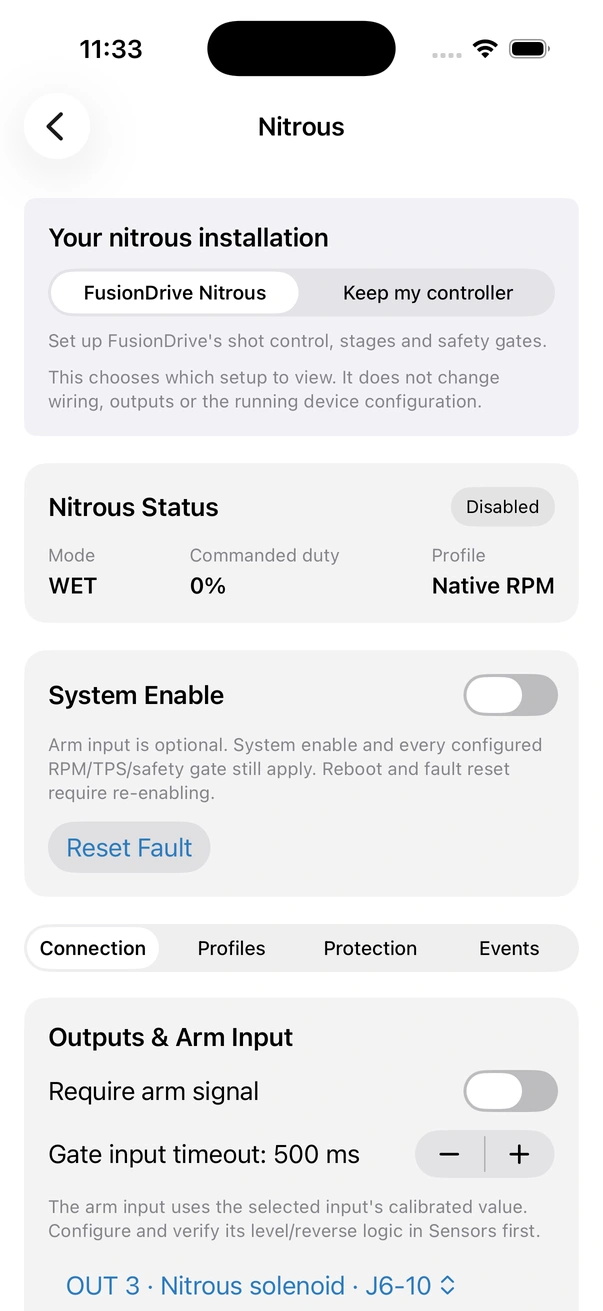
Open More → Nitrous, choose FusionDrive Nitrous, then use Setup, Control, Protection or History. Use the single-stage setup or turn on Independent stages for up to three individually configured dry/wet stages. Each stage can use fixed duty, a timed ramp or an RPM table. Enable, arming, gate measurements, safety limits and output ownership still apply.
Keep my controller opens a guided route to feedback sensors, a compatible control output and local automations. This view selection does not disable FusionDrive Nitrous, release its outputs or configure an external controller. These settings control FusionDrive's own outputs. They do not configure a third-party nitrous controller's internal maps. An existing controller can be observed through available sensors/CAN and operated through a documented compatible control interface; only configure functions that interface actually supports.
Nitrous setup
- Set up sensors and gate sources
Verify RPM, throttle and any enabled speed/temperature gates. Add fuel/bottle pressure and measured wideband AFR or lambda where those interlocks are required.
- Choose arming and output mapping
Review Require arm signal and its calibrated input. Choose dry/wet outputs, or enable Independent stages and map each stage. Keep System Enable off while editing.
- Configure the selected profile
Set activation windows, progression, maximum on-time, cooldown and protections. Wet independent stages have separate nitrous and fuel curves.
- Save and verify
Save applies the selected profile and configuration. Wait for the device response; use Reload saved configuration and inspect the returned values before enabling.
- Exercise every cut without injection
Use dummy loads and controlled inputs to test arming, stale signals, pressure/mixture limits, stage timing and fault reset. Qualify the actual load and installation before a controlled live test.
Nitrous Status and System Enable
The status card shows the state, commanded duty and profile. Expanded status also shows each stage's nitrous/fuel duty and any external retard request. A request being ON does not confirm that an external ignition controller applied retard.
System Enable is separate from the arm input and safety gates. Reboot and Reset Fault require re-enabling. A saved local automation can enable the system, so include automation rules in your arming review. Resetting a fault does not start another shot.
Control: profiles and progression
Three profile cards select the draft to edit. Timed ramps and six-point RPM tables include graph previews and duty sliders. Graphs show draft progression before caps and safety gates; saving applies the selected profile and settings. Independent stages expose labelled stage cards and separate nitrous/fuel curve editors. The status rings show saved live values, not unsaved edits.
Choose Profile to edit A, B or C and set its name. Save applies the selected profile; selecting a profile while editing is not proof that the device changed. In Independent stages, each profile holds its own stage settings and curves. Stage output assignments and system protection bindings are shared configuration, not three extra sets of physical outputs.
Basic Settings
| Setting | Purpose |
|---|---|
| Mode | Dry uses a nitrous output. Wet adds a fuel output. The original single-stage wet behavior uses matching duty; Independent stages exposes separate fuel progression. |
| RPM Window / WOT Threshold | The RPM range and minimum throttle for activation. Use configured compatible signal sources; RPM and throttle need not come only from standard OBD. |
| Control Type | On/Off commands the cap; Ramp progresses over time; RPM Table interpolates across six increasing RPM points and their duty values. |
| Shot Cap | The maximum commanded duty. Duty is not a measured flow or horsepower value. |
The RPM table is editable in the app. Use Save Nitrous Settings to save the selected profile and configuration; the shot cap and all gates remain in effect.
Outputs & Arm Input
Choose Arm Sensor Input and review Require arm signal. When required, the selected calibrated input must be valid and armed. If you deliberately make the arm input optional, System Enable and every configured gate still apply. Configure switch threshold/reverse logic in Sensors and verify the physical switch before use.
Gate input timeout determines when required gate measurements are stale. Under RPM, throttle and safety gate sources, choose compatible configured sources for RPM, throttle, vehicle speed, intake temperature and coolant temperature. A required missing signal blocks activation or cuts an active shot.
Assign available Auto outputs for the selected mode. Saving Dry mode releases the fuel output. Dedicated controllers cannot share a channel: boost, WMI, nitrous, external EBC and a retard request all draw from the same six-channel budget.
A dry stage uses one output; a wet stage uses two. Three wet stages consume all six channels, leaving no spare boost, WMI or retard output. They are possible only with electrically compatible loads/interfaces: AUX1/2 are low-side 1 A-class sinks, not additional high-current pump drivers. See Specifications.
Profiles: timing and safety
| Controls | What they do |
|---|---|
| Ramp Settings | Start duty, end duty, hold at start and ramp duration. A time curve starts from the stage's activation, after its gate delay. |
| Safety | Maximum ON time, cooldown, throttle and RPM hysteresis. Hysteresis defines the reset boundary rather than adding permission to an invalid measurement. |
| Minimum speed | A positive value enables the gate; 0 disables it. |
| Maximum intake / coolant temperature | Set the relevant limit; −1 disables it. Enabled gates require fresh source values. |
Independent stages
Turn on Independent stages and enable the stages you need. Each has dry/wet type and output mapping, plus profile-specific RPM minimum/maximum, throttle minimum, gate delay, maximum on-time, cooldown and reset hysteresis. Set the nitrous curve and, for wet stages, the separate fuel curve: On/Off, Time ramp or RPM table, with its own cap and progression.
Global speed and temperature limits apply to every stage. A stage needs a throttle/RPM reset or arm cycle before retriggering. Wet operation cannot command positive nitrous while its configured fuel output/curve requests zero. Saving prepares stage outputs without generic PWM ramp/calibration, so the stage curves define their progression.
Pressure and measured-mixture protections
- Fuel pressure interlock: enable, choose the source, set minimum/maximum pressure in your preferred pressure unit and freshness. Calibrated psi, bar or kPa pressure sources are converted to psi.
- Bottle pressure interlock: independently choose its source, window and freshness.
- Measured mixture lean interlock: choose measured Lambda or AFR, a matching wideband source, Lean cut above, freshness and lean trip delay. Commanded mixture is not valid measured feedback.
Missing or stale required pressure/mixture blocks a shot; loss during a shot cuts and faults. Lean trip delay applies to a measured lean condition while active, not to missing data. Source calibration, sensor response and physical placement determine what the measurement can establish.
External retard request
Enable an external request output only for a documented compatible ECU/ignition interface. Assign a spare output and set Lead before shot and Tail after normal stop. The output is a binary request; configure the retard amount in the receiving controller. It does not time coils or measure retard degrees. Fault and disable clear the request immediately. Saving prepares immediate full on/off behavior without generic ramp/calibration.
Use Save Nitrous Settings after reviewing the entire mapping and selected profile.
Nitrous states and cuts
| State | What to check |
|---|---|
| Disabled | System Enable is off. |
| Disarmed | Required arming conditions have not been met. |
| Armed | Enabled and armed, waiting for eligible gates and stage timing. |
| Active | One or more outputs are commanded. Inspect individual stage state/duty and measured signals. |
| Cooldown | A shot has ended; cooldown and reset conditions must complete before another activation. |
| Fault | A protection stopped operation. Correct the cause, inspect fresh measurements, reset and explicitly re-enable when ready. |
Recent Events
Review recorded state changes alongside selected profile, duty, protection and RPM channels. Event detail varies by source; not every transition includes a full reason. A connected phone recording at the time can retain controller channels and events in a drive log, including individual stage state and commanded duty. Full drive logging still requires the phone; the controller's local operation does not depend on it.
Basic starts and Advanced tuning
Choose retained third-party control or Fusion control to reveal the relevant setup. Retained controllers expose their supported trigger/inhibit and monitoring interfaces; they do not automatically expose every internal adjustment. Fusion control adds configured sources, protections and progression. Start with editable basic settings, then expand Advanced for tables and specialist options. A WMI table seeded from its basic ramp is an approximation on fixed 5 PSI points: values between the basic thresholds can differ, so review the preview. Nitrous arm/disarm preserves activation gates, paired fuel delivery and stage logic; WMI prime is a timed test, not an unlimited bypass of protection.
Related
- Output presets — WMI Pump and Nitrous Solenoid.
- Level / switch inputs — wiring the tank and arm switches.
- Automation recipes — tank-empty and safety rules.
- Boost Control safety.
- CAN & OBD — reliable RPM and throttle for nitrous.
- Alerts — WMI fault and Nitrous fault notifications.