Controls tab and Outputs
FD Design LS has six PWM control channels: OUT1–4 supply 12 V on the high side; AUX1/2 switch compatible loads or control inputs to ground. Use suitable sensors and external interfaces to keep existing equipment, or assign compatible loads directly to FD. The same six channels are shared by boost, WMI, nitrous, external EBC and rules.
The six outputs
| Output | Default name | Class | Harness B lead | Good for |
|---|---|---|---|---|
| OUT 1 | Output 1 | High-side; validate load | orange · OUT1 10A | Compatible boost solenoid, pump or fan |
| OUT 2 | Output 2 | High-side; validate load | blue · OUT2 10A | Compatible pump, fan or solenoid |
| OUT 3 | Output 3 | High-side; validate load | grey · OUT3 10A | Water/meth pump, cooling fan, fuel pump |
| OUT 4 | Output 4 | High-side; validate load | tan · OUT4 10A | Nitrous solenoid, intercooler spray, lights |
| AUX 1 | Output 5 | Low-side sink, nominal 1 A-class | violet · AUX1 1A | Compatible ground-trigger control input or low-current load |
| AUX 2 | Output 6 | Low-side sink, nominal 1 A-class | pink · AUX2 1A | Compatible ground-trigger control input or low-current load |
OUT wiring: output → load positive; load negative → common ground. AUX wiring: fused compatible positive supply → load positive; load negative → AUX. AUX is not a source of 12 V or an isolated contact. Follow LS wiring and load limits; OUT1–4 need a dedicated feed. Lead labels such as “10A” do not establish tested continuous assembly capability.
Controls tab
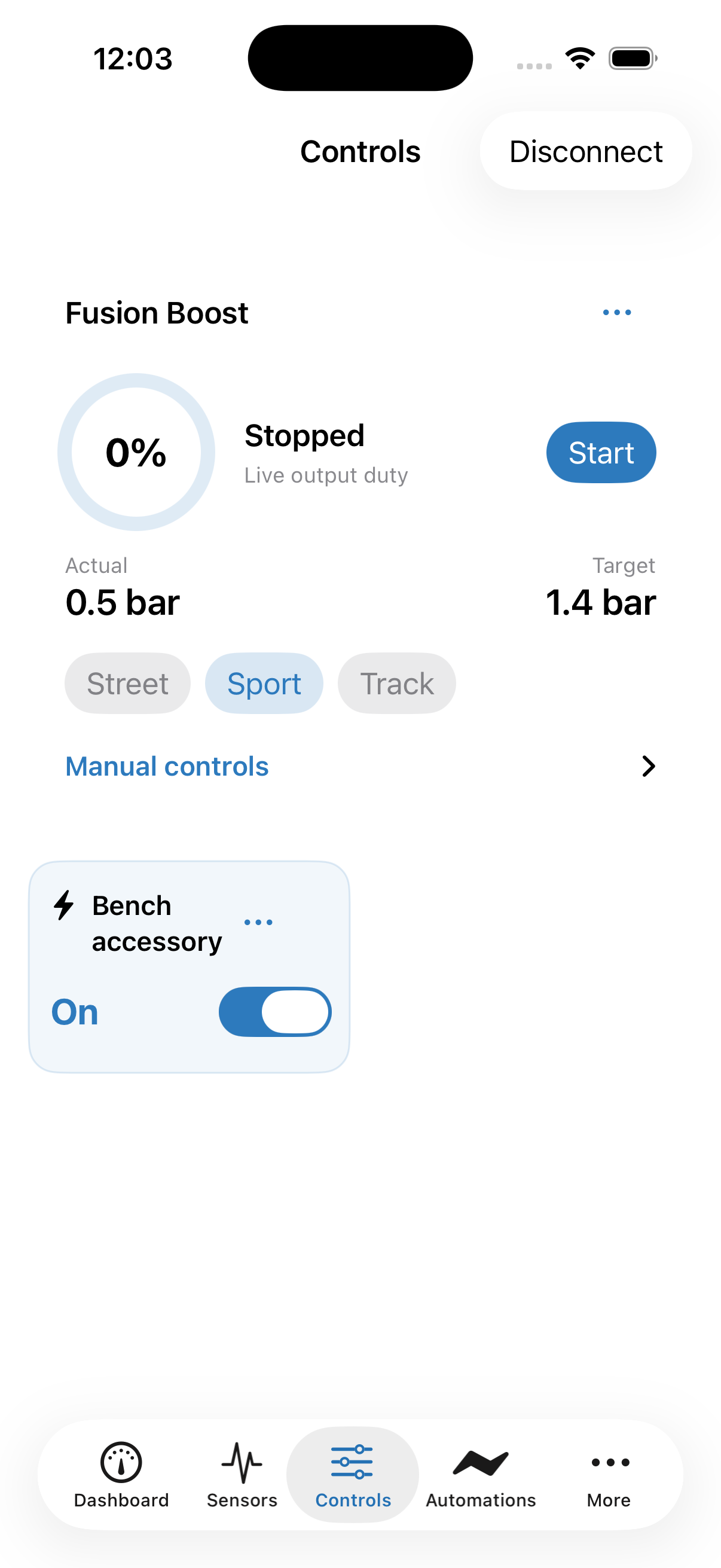
Controls is your live control panel. Configured accessories appear here, including those following saved rules. Compact output cards show their name, current state and an On/Off switch. Dedicated boost, WMI and nitrous cards provide their own live actions; expand Manual controls when needed. Open its three-dot menu to edit setup; connector details, wiring and electrical settings stay in Settings.
Third-party boost groups
The configured controller shows your named groups and Previous / Next controls. Available directions and wrap-around follow its saved one-wire or two-wire configuration. The displayed group is FD's tracked command state, not independent feedback from the controller. Model selection, pulse timing, wiring, group names and ignition-cycle behavior are configured in Boost Control.
Output controls and saved rules
For a generic output, use its On/Off switch. Open its additional controls when you need to adjust duty. A manual command takes control from saved output rules; the card explains when you are controlling it yourself. Choose Resume automation when you want the configured automation logic to take over again. A configured but disabled generic output remains visible. A live On command first prepares it for manual use, waits for the device to accept that setup, then sends the requested duty.
Controller-owned outputs use that controller's actions: boost uses its profiles and manual-duty controls; WMI uses its supported timed prime/test and stop actions; nitrous uses arm/disarm and configured progression. Arming does not bypass activation conditions. Fuel and nitrous stages stay coordinated, and sensor, output and protection gates still apply. A successful tap is confirmed by the device; an interrupted connection does not mean a command was applied.
One place to configure
Use Settings for setup. Use Controls for deeper live actions and the Dashboard for glance controls. Names and saved configurations stay on FusionDrive. Generic PWM live demands start off after restart. Saved Fusion Boost manual mode and its duty setting can resume when enabled and its gates permit; nitrous starts disarmed.
Outputs screen (Settings → Outputs)
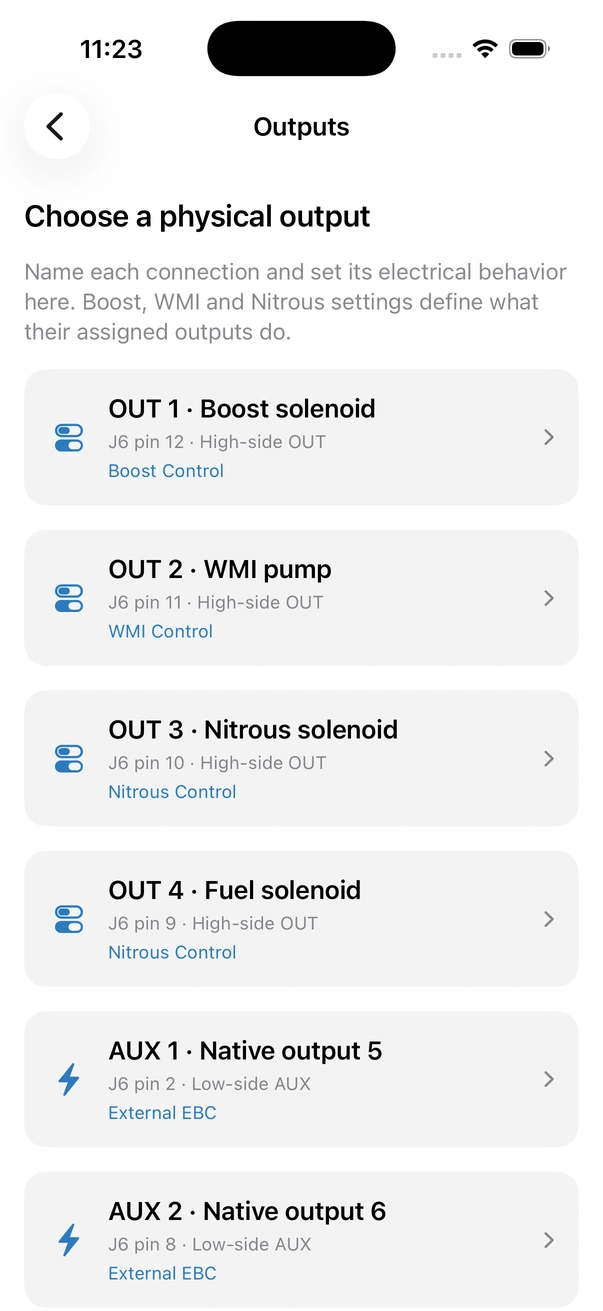
Open Settings → Outputs (also linked from Settings). The six rows identify each physical OUT/AUX channel, connector pin and assigned function. Tap a row to configure its name, operation and electrical response. Use Save Output Setup, wait for acknowledgement, then Reload saved values to confirm the ESP configuration. The icon is a separate preference stored on this phone.
| Setting | What it does | Range / options | Default |
|---|---|---|---|
| Enabled | Master switch for the channel. A disabled output stays visible when configured. Live On can prepare a generic output for manual use before commanding it; controller-owned channels use their controller actions. | On / Off | Review in setup |
| Show on Dashboard | Adds the output's quick card to the Dashboard and to CarPlay's Outputs tab. | On / Off | Review in setup |
| Turn off on ignition off | Stops the output when neither a valid dedicated ignition signal nor fresh running-engine OBD evidence keeps vehicle activity on. OBD-only installations do not require the dedicated IGN wire for this software gate; stale or stopped-engine data is not running evidence. | On / Off | Off |
| Load type | Selects the load role for an unassigned channel. Review and set the displayed frequency and limits before saving — see Output presets. | Custom accessory · six PWM starting presets · eight on/off accessory presets | Generic |
| Switching frequency | The PWM switching frequency in hertz — see Frequency. | 1–40,000 Hz | 1000 Hz (preset dependent) |
| Minimum duty | Lowest duty the output will ever be driven at when it is on. Requests below this are raised to the minimum. | 0 – 100 %, step 1 | 0 % (preset dependent) |
| Maximum duty | Highest duty the output will be driven at. Requests above this are capped. | 0 – 100 %, step 1 | 100 % |
| Name | Display name (set in Settings → Outputs). Appears on cards, in automations, CarPlay and logs. | Free text | Output 1 … Output 6 |
| Icon | Symbol shown on the card; saved on this phone. | Choice of icons | By channel |
Who controls the output?
Enable an output and configure the rules that should operate it. Enabled rules automatically act on their assigned enabled outputs when their conditions are met. There is no separate Disabled, Direct or Automatic mode to select.
Use Off, On or the duty control whenever you want to take over. Your manual command holds the generic output until you choose Resume automation. This action appears when a saved enabled rule can control that output and a manual override is active. It releases your override so the saved rule conditions determine the output again; it does not force the output on.
Electrical limits, calibration, ramps and ignition-off policy remain in Settings. Assigned boost, WMI and nitrous outputs use their controller-specific actions so paired stages and protections remain coordinated.
Live Stop takes precedence over matching saved controller actions until you explicitly resume/start that controller. It does not remove its saved profiles or protections. Global recovery and safety shutdowns still stop outputs.
Output presets
Selecting a preset fills its starting frequency and duty limits. You can change these before saving. The values are starting points, not a claim that every pump, fan or valve accepts the same electrical drive; match the connected equipment specification. Selecting a load preset does not assign or enable a Fusion controller.
| Preset | Frequency | Min duty | Max duty | Why these values |
|---|---|---|---|---|
| Generic | 1000 Hz | 0 % | 100 % | Starting values only. Verify the load interface first; use mechanical relays strictly on/off. |
| Boost Solenoid | 30 Hz | 0 % | 100 % | Typical 3-port boost solenoids are designed for 30–50 Hz. Select this on the channel you assign in Boost Control. |
| WMI Pump | 500 Hz | 0 % | 100 % | A starting duty floor for a compatible pump. Actual flow, current, start-up and minimum operating duty must be verified. |
| Cooling Fan | 25 000 Hz | 0 % | 100 % | Use only with fans/drivers that support this supply-switching frequency; integrated fan electronics may require a separate control interface. |
| Fuel Pump | 250 Hz | 30 % | 100 % | A starting duty floor only. It cannot establish adequate fuel delivery; validate pressure, flow and demand. |
| Nitrous Solenoid | 100 Hz | 0 % | 100 % | Fast switching for progressive nitrous ramps. Select on the nitrous and fuel solenoid channels. |
| Relay, Auxiliary lights, Water pump, Intercooler spray pump, Purge valve, Heater, Accessory enable, Solenoid valve (on/off) | 1000 Hz stored; no switching at steady Off/On | 100 % for nonzero requests | 100 % | Switched-load starting presets: zero is Off, any nonzero demand is full On. Use only compatible supply/control inputs; keep mechanical relays on/off. |
A mechanical relay or a plain on/off solenoid driven at 50 % duty will chatter and overheat. Use the matching on/off preset: zero remains Off and nonzero demand is full On. Do not change a relay to progressive PWM. If you want a relay to switch a big fan, put the relay on an AUX output and switch it on/off; the fan then runs at full speed.
Frequency
Frequency is how many times per second the output switches when it is between 0 and 100 %. Frequency affects valve motion, motor operation, losses and heating. Match it to the actual load or external driver; duty alone does not establish delivered power or flow.
- Low (30–100 Hz) — boost solenoids, water/meth and nitrous solenoids. Their valves are designed to follow pulses at this rate.
- Medium (200–1000 Hz) — fuel pumps, general loads.
- High (10 000–25 000 Hz) — fans and motors where audible whine matters.
The software range is 1–40,000 Hz. At 100 % duty the frequency has no effect, so it is irrelevant for pure on/off loads.
Duty limits
Min and Max duty are guard rails the device applies to every source — manual, automation, Boost Control, WMI or Nitrous. If Boost Control asks for 100 % on a channel with Max 80 %, the solenoid gets 80 %. If a rule asks for 5 % on a pump with Min 30 %, it gets 30 %. Zero is always allowed: OFF means off regardless of Min.
PWM still applies supply-voltage pulses at reduced duty. A duty limit is not a voltage regulator. Validate minimum operating duty and maximum current/temperature against the actual load; use a proper interface for a different supply voltage.
Per-output settings in Settings → Outputs
Each output has one setup page. Name & appearance holds its name and phone icon. Output setup holds Enabled, visibility, ignition-off policy and Switching frequency. Electrical limits & response holds minimum/maximum duty and Ramp rates & calibration. A controller-owned output links back to that controller for assignment, targets and progression. EBC-reserved AUX device settings are read-only; its phone icon remains editable. Independent nitrous stages and retard requests use immediate, uncalibrated response configured by Nitrous.
"Dedicated 12 V rail not connected" warning
OUT1–4 require the correctly fused dedicated feed on Harness B, J6 pin 1. Check both grounds and ignition wiring. The Rev A-LS backfeed path can make the app’s dedicated-feed indication unreliable when that feed is absent; verify the real supply electrically before enabling a load.
Saving a preset cannot supply missing power. AUX switches an externally supplied compatible load to ground; it does not power a pump from OBD. Use the LS wiring reference and test with actuators disconnected before enabling control.
What happens on disconnect, ignition off and sleep
| Event | Output behaviour |
|---|---|
| Phone disconnects (Bluetooth lost, app closed) | No change. Outputs keep their duty; Auto outputs keep being driven by their controller; automations keep running. |
| Ignition switched off | Vehicle activity uses dedicated IGN, fresh running-engine OBD evidence, or both. A live dedicated IGN signal can keep activity on even with zero RPM. Loss of both sources applies the configured shutdown policy. This is software control, not a physical load disconnect. |
| About one minute with no ignition and no CAN traffic | The device forces every output off, saves its settings, and goes to sleep. Nothing can switch an output on while asleep. |
| Ignition on / CAN traffic returns | After wake, generic live PWM duty starts off. Saved controller and rule configurations, including Fusion Boost manual settings, resume evaluation against fresh inputs and configured gates. Nitrous starts disarmed; test actual wake timing on the installed vehicle. |
| Firmware update / reboot | Generic PWM live demand starts off. Saved Fusion Boost manual settings and other configured controllers/rules can command outputs when their gates allow; nitrous starts disarmed. |
Generic PWM live demand is not restored after restart. Saved Fusion Boost manual mode/duty and local rules can resume when their configured conditions permit; nitrous starts disarmed. Configure ignition-off behaviour and test boot, wake, sensor loss and phone disconnection for each installed load.
Related
- Wiring — connector pin-out, fuse sizes, dedicated 12 V feed.
- Boost Control → Output channel.
- Water/meth & Nitrous — pump and solenoid outputs.
- Automations → Actions — switching outputs from rules.
- CarPlay → Outputs.