
Installation guide
From box to first drive: where to mount the controller, how to power it, how to plumb the boost line, and how to land sensors and loads on the three pre-terminated harnesses.
FusionDrive switches real current to real loads and can control boost, water/methanol injection and nitrous. Incorrect wiring can damage the controller, the vehicle or the engine, and can start a fire. If you are not confident working on 12 V vehicle electrics, have the installation done by a qualified auto electrician or performance workshop. Disconnect the battery negative terminal before connecting the dedicated power feed.
Read the whole guide once before touching the car. Most installs go in one of two ways: OBD-powered monitoring (controller, supported vehicle data and compatible sensors) or dedicated feed (add a fused battery feed before using OUT1–4). AUX1–2 are low-side switches for compatible, separately supplied loads or ground-trigger inputs. Decide which one you are doing in section 6 before you pick a mounting spot.
1. What's in the box
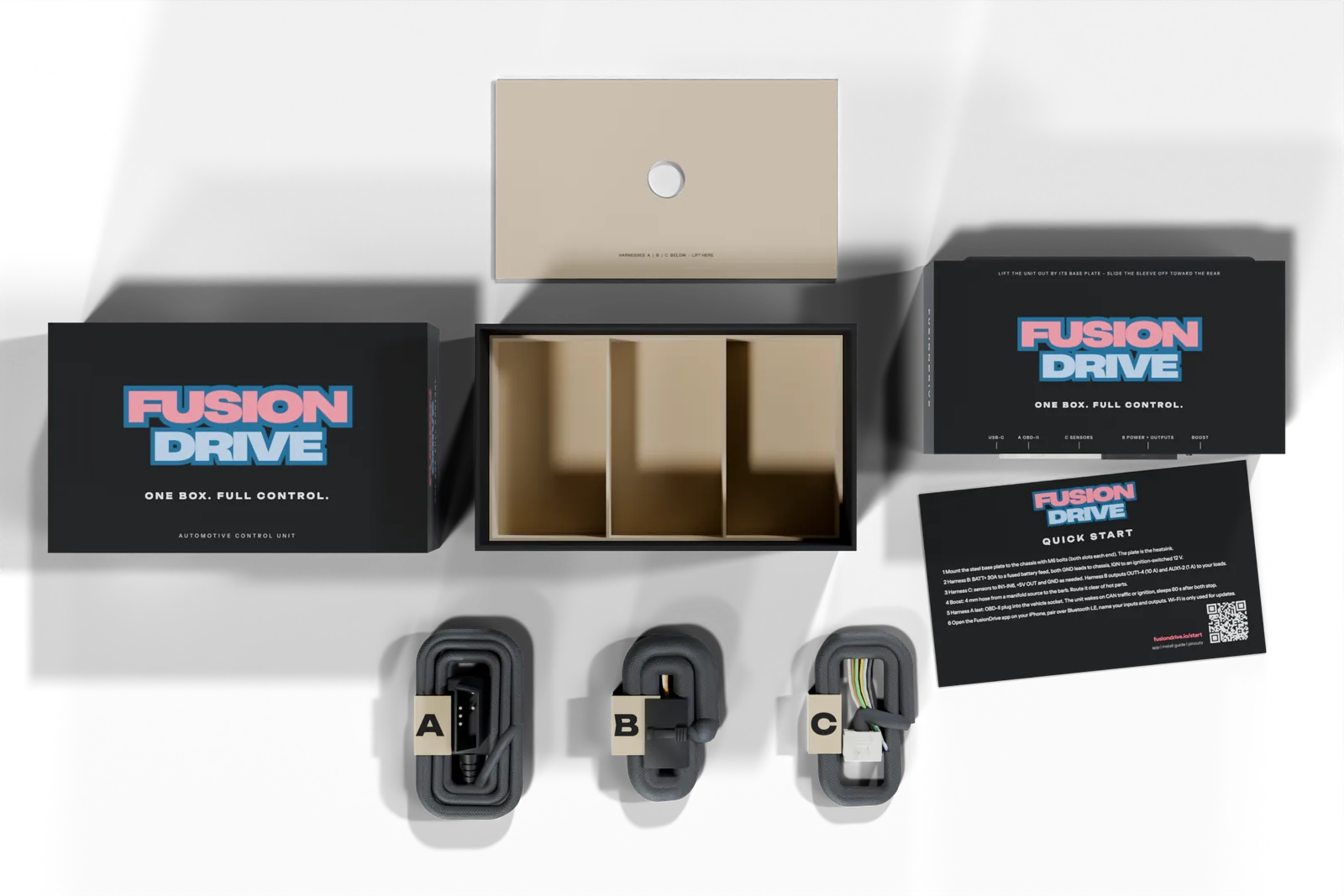
| Item | What it is | Length |
|---|---|---|
| FusionDrive controller | The unit itself: black enclosure on a steel base plate with four mounting slots. All connections are on one face: the service port, the OBD port, the sensor port, the power & outputs port and the boost hose barb. | — |
| Harness A — OBD-II 4 wires | Plugs into the OBD port on the controller. The other end is a low-profile OBD-II plug for the vehicle's diagnostic socket. Carries vehicle power, ground and the vehicle CAN bus. | 1.5 m |
| Harness B — Power & outputs 12 leads | Plugs into the power & outputs port. Twelve labelled flying leads: battery feed, two grounds, ignition sense, CAN 2, OUT1–OUT4 and AUX1–AUX2. | 0.5 m |
| Harness C — Sensor inputs 8 leads | Plugs into the sensor port. Eight labelled flying leads: IN1–IN6, a 5 V sensor supply and sensor ground. | 0.5 m |
| Quick start card | Six steps to first power-up on the front; on the back, every lead on harnesses A, B and C with its label and wire colour. Keep it in the glovebox. | — |
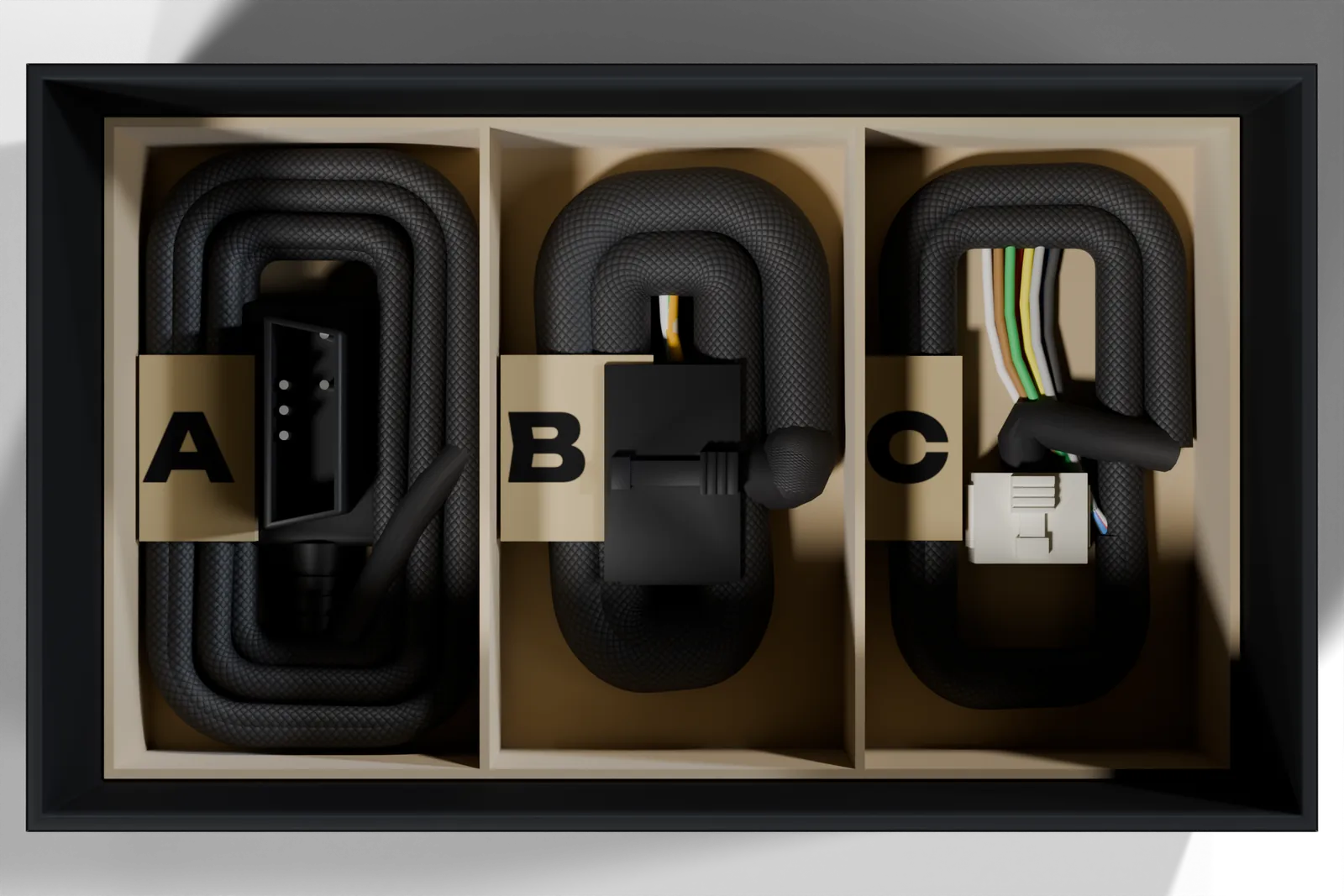
Unpacking
Lift the lid and the controller is on top, in a paper sleeve printed with the connector legend, with the quick start card resting on it. Lift the controller out by its steel base plate, not by the cover. The panel under it lifts away to show the harness tray.
Leave each harness in its band until you need it: the letter on the band is the same A, B or C used on the quick start card, in this guide and in the wiring reference.
Not included: mounting bolts, the boost hose and T-piece, ring terminals for the battery feed, and fuses for individual loads. See the next section.
2. Tools and materials
Tools
- Drill and 6.5–7 mm bit (if not using existing holes)
- 10 mm socket or spanner for M6 mounting bolts
- Wire strippers and a ratchet crimper for insulated terminals
- Heat gun for adhesive-lined heat shrink
- Multimeter
- Side cutters, cable ties, trim tools
- Hose cutter or sharp blade for the boost line
Materials
- 4 × M6 (or ¼ in) bolts, washers and nuts or rivnuts
- 2 mm (5/64 in) bore silicone vacuum hose for the boost barb, plus a T-piece or reducer to join it to the vehicle's boost line (see section 8)
- Manufacturer-compatible inductive suppression for each load you switch (see section 11)
- Ring terminal for the battery positive post (12 AWG / 3.3 mm² wire)
- Inline fuse holder for the battery end of the dedicated feed; protect the selected cable and load within the 30 A fused-path limit
- Individual load fuse holders and fuses selected for the actual cable, load and validated output capability
- Automotive-grade wire to extend leads: match or exceed the lead gauge in the wiring reference
- Adhesive-lined heat shrink, split loom or braid, cable ties
Use crimped, heat-shrunk joints or proper splice connectors. Do not use twist-and-tape joints or "vampire" taps anywhere on the harnesses. The harness wire is rated for engine-bay temperatures; anything you add should be too.
3. Choosing a mounting location
The controller is designed to live in the vehicle permanently. Pick the location with the harness lengths in mind: the OBD harness reaches 1.5 m from the controller, the power & outputs and sensor harnesses reach 0.5 m before their flying leads start, and extensions must account for voltage drop, current, signal integrity and the installation environment.
Good locations
- Under the dash or behind the kick panel, near the OBD socket
- Behind the glovebox or under a seat
- In a dry, ventilated corner of the engine bay away from the exhaust, turbo and radiator fan, bolted to a steel panel or bracket
- Anywhere the steel base plate can bolt flat to the body: the plate carries heat away from the controller
Avoid
- Directly on or next to exhaust components, the turbocharger or the radiator
- Anywhere water pools or sprays: wheel arches, under the scuttle drain, floor pans that get wet
- Loose, hanging from the harness, or cable-tied to a moving part
- Inside a sealed box with no airflow around the controller when driving high-current loads
- Wrapped in insulation or foam
Think about the connector face too. All plugs and the boost barb are on one edge, and the plugs need about 60 mm of clear space in front of that edge so the cables can leave without a sharp bend. The boost hose exits from the same edge, on the right when you look at the face.
The controller talks to your iPhone over Bluetooth. A cabin location gives the strongest, most reliable connection. An engine-bay location works, but a steel firewall between the controller and the phone reduces range. If you mount in the engine bay, check the app stays connected from the driver's seat before finalising the position.
4. Mounting
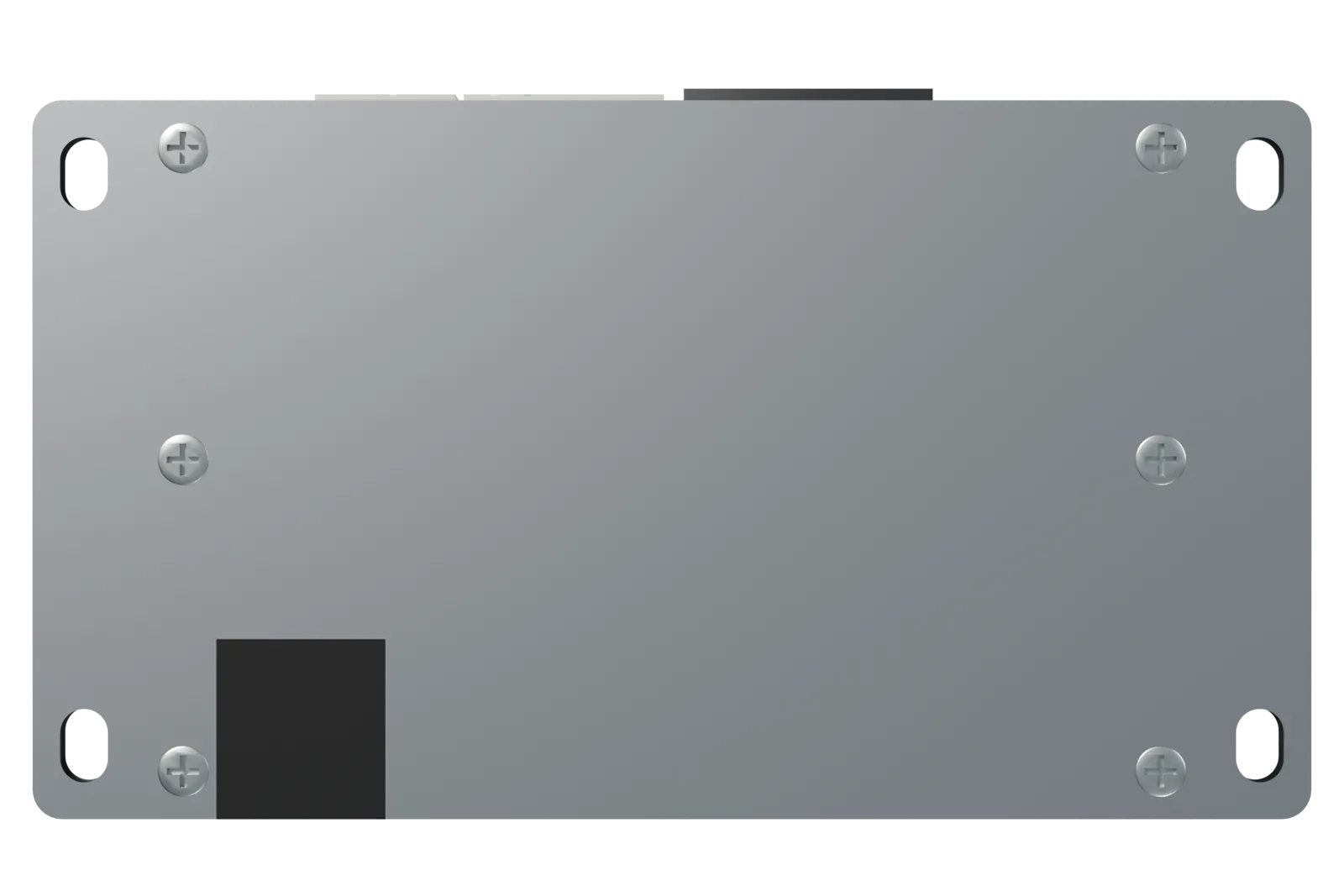
- Mark the holes. Hold the controller in place with the connector face toward the space you have reserved for cables, and mark the four slot centres: 160 mm apart across the unit, 78 mm apart front to back. Use the controller itself as the template.
- Drill or reuse holes. Drill 6.5–7 mm holes, or line up with existing threaded studs. Check what is behind the panel before drilling: wiring, fuel and brake lines, the fuel tank.
- Bolt it down. Use four M6 bolts with flat washers under the head. Nuts with spring washers or nyloc nuts on the back, or rivnuts in sheet metal. Tighten to about 8 N·m (6 lb·ft) for M6 into a nut or steel bracket; for rivnuts in thin sheet stop at about 5 N·m or the rivnut will spin. There is no need to crush the plate. If the surface is not flat, use a bracket rather than bending the plate.
- Orientation. Any orientation works. Connector face down or sideways is best in the engine bay so water cannot sit on the plugs. Leave the 60 mm clear zone in front of the connector face.
- Do not open the enclosure. There is nothing to set inside. The 30 A fuse for the dedicated feed lives inside the controller and is only replaced in the unlikely event of a fault; see troubleshooting.
The base plate is the controller's heatsink. Bolted to a body panel or bracket, the car itself carries heat away from the power outputs. Mounting on plastic or carpet still works for OBD-only installs, but if you drive pumps and fans continuously, mount to metal.
5. Wiring overview
Everything connects through the three ports on the connector face. This is a connection overview. Use the channel-specific diagrams below and in the wiring reference for actual load polarity; an OBD-only monitoring install uses just the vehicle-data connection.
6. Connecting power
Harness A can power the controller for monitoring. Harness B provides the dedicated load feed, ground and ignition sense. You can use both harnesses together. OUT1–4 source the positive side of a load; AUX1–2 switch its negative side to ground.
| OBD-powered monitoring | Dedicated fused feed | |
|---|---|---|
| Connection | Harness A to a compatible vehicle OBD-II socket. | J6 pin 1 BATT+ to fused battery positive; both J6 GND leads (pins 4 and 7) to a sound return; J6 pin 3 IGN to verified ignition-switched 12 V. |
| Purpose | Controller, Bluetooth, supported CAN/OBD data and compatible sensors. Available vehicle parameters depend on the ECU. | Required supply for OUT1–4 and the controller. The four heavy outputs share the 30 A fused path; actual continuous capability must be validated. |
| Protection | The board has 2 A self-resetting protection on the OBD supply. Do not use the diagnostic connector as a pump or fan supply. | Internal 30 A path fuse plus an external fuse near the battery sized for the cable and installation, no larger than the supported path limit. Fuse individual loads too. |
| AUX1–2 | Nominal 1 A-class low-side sinks, not powered 12 V outputs. A compatible load connects from its fused +12 V supply to AUX; the supply and FusionDrive share ground. Confirm current, suppression and power sequencing. | |
| Ignition | CAN traffic can affect wake and sleep when no IGN wire is fitted. | IGN is sense/wake only, not a hardware load-power disconnect. Configure and test ignition-off behaviour for every assigned output/controller. |
On the LS Rev A assembly, an unplugged dedicated feed can backfeed the load rail and produce a false feed indication or an unstable heavy-output supply. Fit the dedicated fused feed before using OUT1–4. Verify it at J6 pin 1 with a meter; the app or LED alone is not proof. Software cannot correct this power-path issue.
6a. OBD-powered install
- Find the OBD-II socket. It is within about a metre of the steering wheel on every car built for OBD-II, usually under the dash on the driver's side, sometimes behind a small cover.
- Route Harness A. Run the harness from the controller to the socket, following existing looms and away from pedals, steering column moving parts and the driver's feet. Secure with cable ties every 200–300 mm.
- Plug in. Push the low-profile plug fully home. It sits about 18 mm proud of the socket so it stays clear of your knees. Check parked-current draw and sleep/wake behaviour before leaving it connected long term.
Many OBD sockets remain powered with the key off. Sleep and wake depend on configuration, ignition sense and actual CAN activity; some vehicles keep sending traffic after locking. Check the sleep settings, verify the installed vehicle's parked-current draw and test reconnection. Do not assume a fixed one-minute delay or instant phone reconnection.
6b. Dedicated fused feed
- Disconnect the battery negative terminal before you start.
- Ground first. Crimp both GND leads from Harness B (14 AWG each) to ring terminals and bolt them to a clean, bare-metal chassis ground point close to the controller. Scrape paint under the terminal, use a star washer, and re-protect the joint with grease or paint afterwards. Connect both GND leads. Do not assume the current divides equally; validate the complete return path and its voltage drop under load.
- Route the positive feed. Run 12 AWG (3.3 mm²) or heavier wire from the battery positive post to the controller. Extend the BATT+ 30A lead with the same gauge, crimped and heat-shrunk. Route away from the exhaust, sharp edges and moving parts, through grommets where it passes through panels. Add a rubber grommet or split loom anywhere it passes through metal.
- Fuse at the battery. Fit a suitable automotive fuse within 300 mm of the battery positive terminal. Size it to protect the actual cable and load, no larger than the 30 A path limit. The diagram shows the path limit, not a continuous-load qualification. The wire between the battery and this fuse is unprotected: keep it short and well insulated.
- Battery terminal. Crimp a ring terminal sized to the battery post bolt and connect it last, after everything else is finished and checked.
- Do not use the cigarette lighter, radio or accessory circuits as the high-current feed. They cannot carry the load and their fuses will blow.
FusionDrive is for 12 V vehicle electrical systems only. Do not connect it to 24 V systems. Double-check polarity before reconnecting the battery: BATT+ 30A to positive, both GND leads to ground. Reversed connections can damage the controller and are not covered by warranty.
6c. Grounding
OUT1–4 carry the positive side of their loads, so those loads return to a suitable chassis/ground point. AUX1–2 carry the switched negative side: the load's negative terminal goes to AUX and current returns through FusionDrive's power ground. All connected supplies need the correct common reference.
- Connect both Harness B GND leads, J6 pins 4 and 7, to a clean, secure power ground with adequate cable and termination capacity.
- Check voltage drop under the actual load. A painted surface, rubber-mounted bracket or loose joint is not a reliable return.
- Harness C sensor GND is a measurement reference, not a return for pumps, relay coils or other loads.
7. Ignition sense
Connect Harness B IGN (J6 pin 3) to verified ignition-switched 12 V. This is a low-current sense/wake input. It tells configured logic about the key state; it does not physically disconnect the load supply.
- Choose a suitable fused circuit after checking the vehicle wiring diagram and its behaviour during cranking, accessory mode and key-off. Do not tap critical safety or ECU-control wiring without an approved interface.
- Never connect permanent battery positive to IGN. A permanently asserted input can prevent the intended sleep/ignition behaviour.
- Generic output ignition-off settings, controller gates and automation conditions must be configured and tested for the application. Outputs are turned off for deep sleep, but a key-off awake period may remain.
- Use an independent, appropriately rated power cut-off where the installation requires a physical interlock. An app setting is not electrical isolation.
With no IGN wire, CAN traffic may provide wake/activity information, but it is not proof that the engine is running. Verify shutdown and parked-current draw on the actual vehicle.
8. Connecting the boost hose
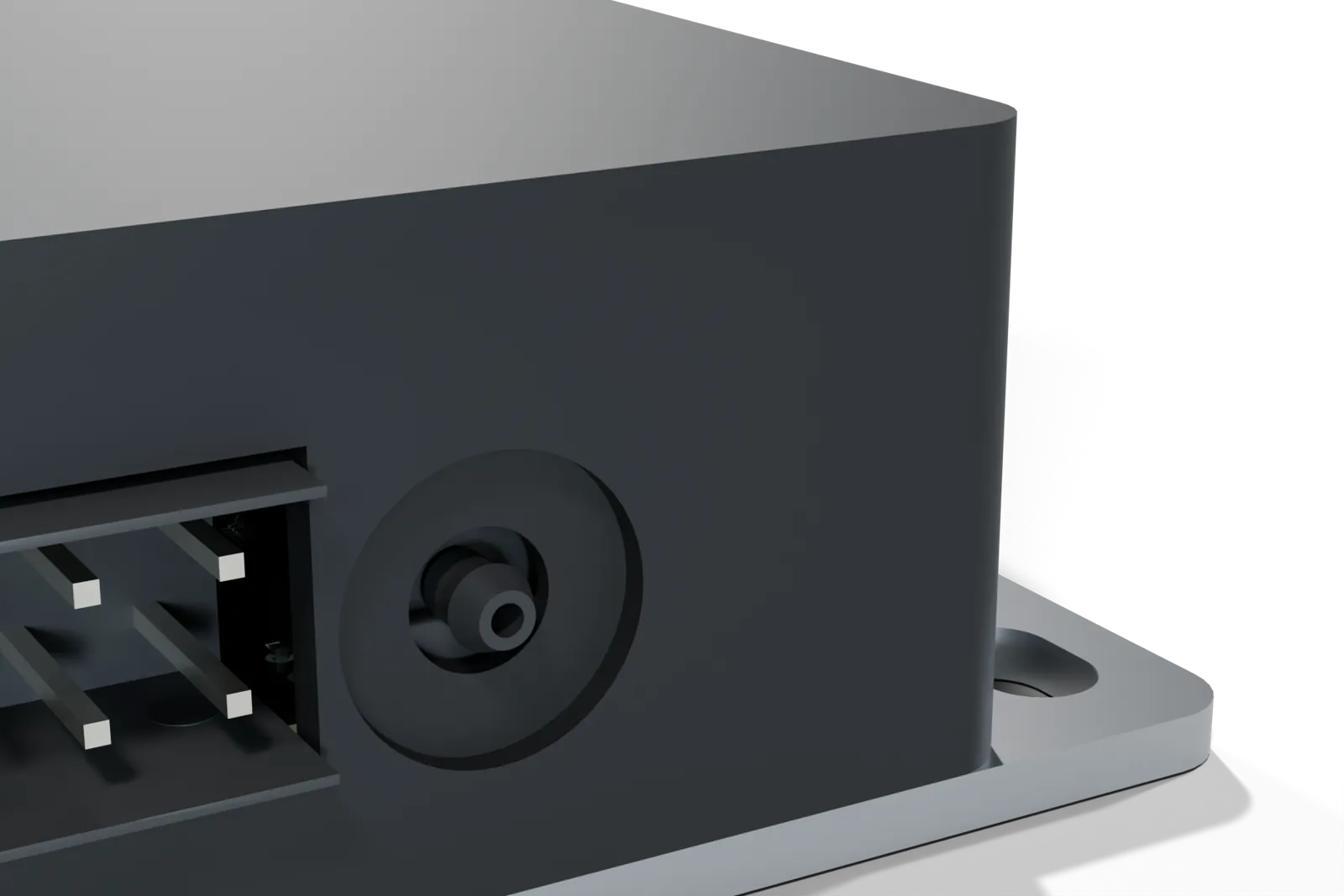
FusionDrive has a boost sensor built in. One hose from the intake manifold to the barb gives you true gauge boost (relative to the air around the car) with no dependence on the factory sensor. The onboard sensor measures gauge boost and vacuum; see specifications.
- Choose a source. Use a suitable manifold pressure port after the throttle body where applicable. A dedicated port is preferable. Retain existing gauges and sensors; share a reference line only after checking that the added hose cannot disturb its function. Do not alter a fuel-pressure regulator, brake or other critical reference line without qualified assessment.
- Fit a T-piece. If the selected reference line is suitable for sharing, fit a correctly sized, leak-free T-piece. The third leg feeds FusionDrive. If the manifold has an unused port, use a plug-in barb fitting instead and skip the T.
- Run the hose. The controller's barb is small: about 2 mm across. Use 2 mm (5/64 in) bore silicone vacuum hose on the barb; it stretches on firmly. Most vehicle boost lines are 3–4 mm, so use a T-piece with a 2 mm leg, or a short 4 → 2 mm reducer at the T. Keep the run as short as practical, route it away from exhaust heat and sharp edges, and avoid low loops where fuel or water could collect.
- Push it on. Push the hose fully over the barb on the controller. A small spring clip or cable tie is a good idea on the manifold end; on the controller end a snug hose is enough.
- Check for leaks. Compare the selected onboard pressure reading with the expected engine condition or a reference gauge. Many throttled petrol engines show idle vacuum; this is not universal. Investigate unexpected readings before enabling boost control.
Do not connect the barb to anything that can push liquid into it: fuel, oil, coolant or water/methanol lines. The sensor is for air only. Route and position the sensor so liquid cannot collect in the hose or enter the barb; a low loop is not a guaranteed drain or separator.
9. Plugging in the three harnesses
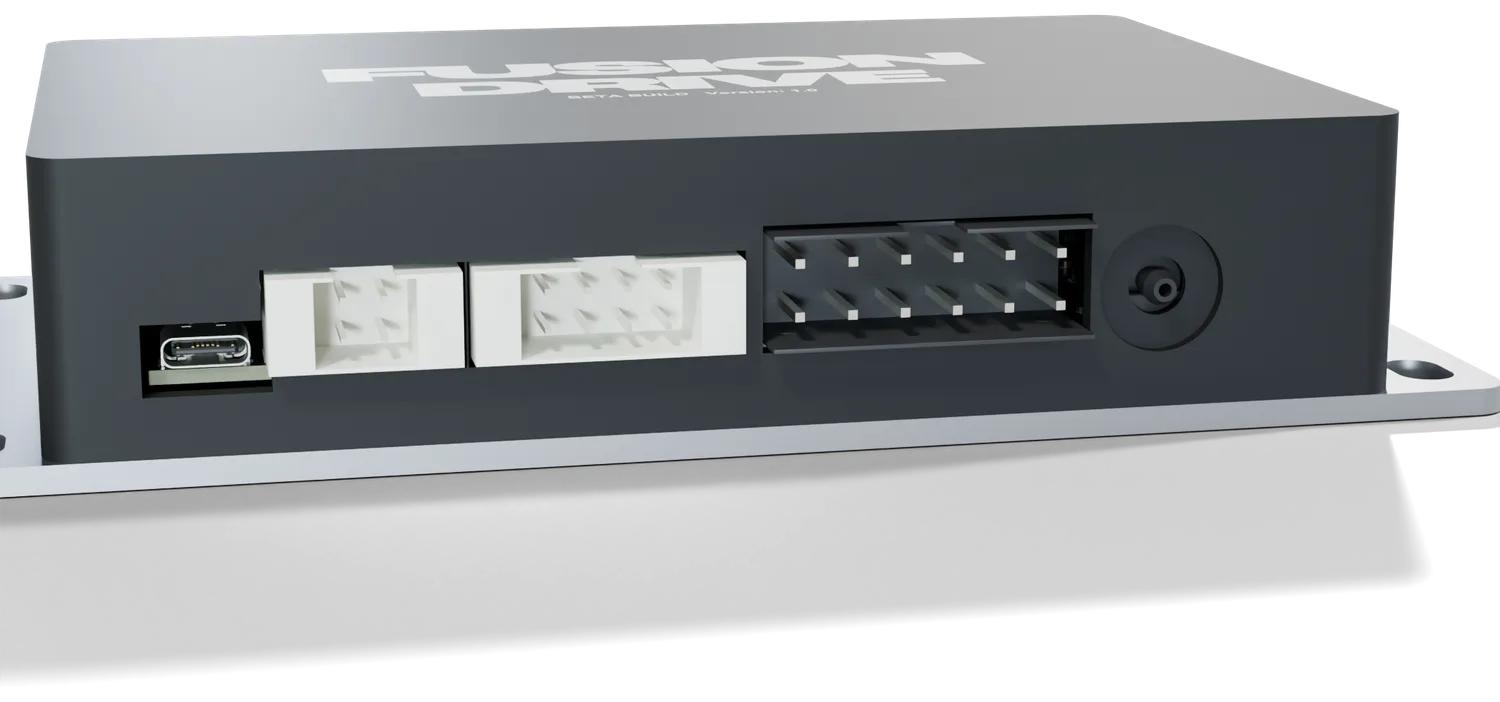
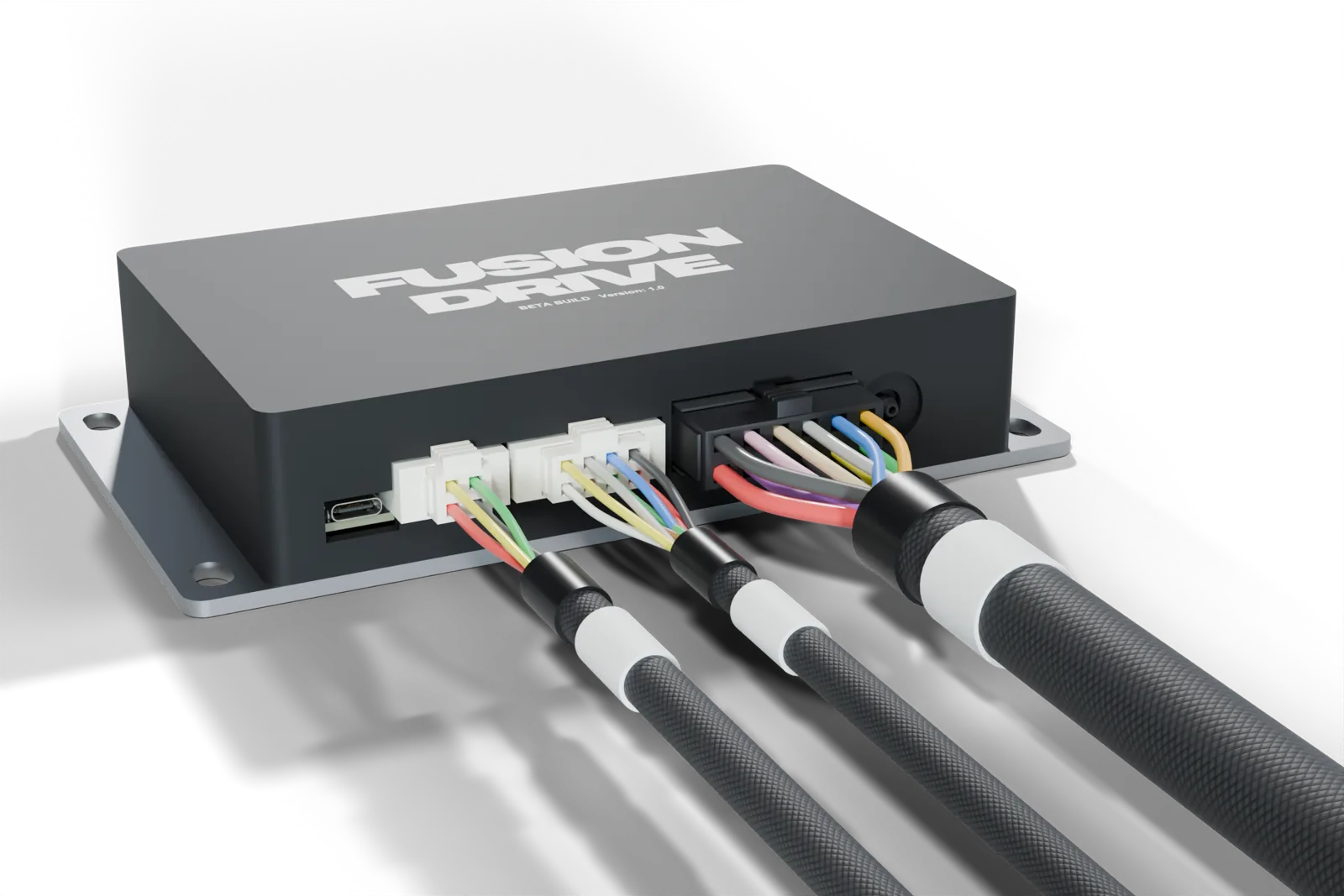
Each plug is a different size and is keyed, so it cannot go into the wrong port or in upside down. Each has a latch on one side that clicks when fully home.
- Harness C — Sensor inputs into the 8-way sensor port (second from the left). Wire your sensors first (section 10), then plug in.
- Harness B — Power & outputs into the 12-way power & outputs port (the wide one). Wire the power feed, ignition and loads first (sections 6, 7 and 11), then plug in with the battery still disconnected.
- Harness A — OBD-II into the 4-way OBD port (next to the service port). Plug this in last: it is what powers the controller up on most vehicles.
- Listen for the click on each plug and give the cable a gentle tug. To remove a plug, press the latch tab and pull the plug body, never the wires.
- Support the cables. Cable-tie the harnesses within 100–150 mm of the controller so the plugs do not carry the weight of the loom, then secure along their route.
The small port at the far left is a service port used by workshops and support. It is not needed for installation, pairing or firmware updates, which all happen wirelessly. Leave it uncovered but do not connect anything to it unless support asks you to.
10. Sensor wiring
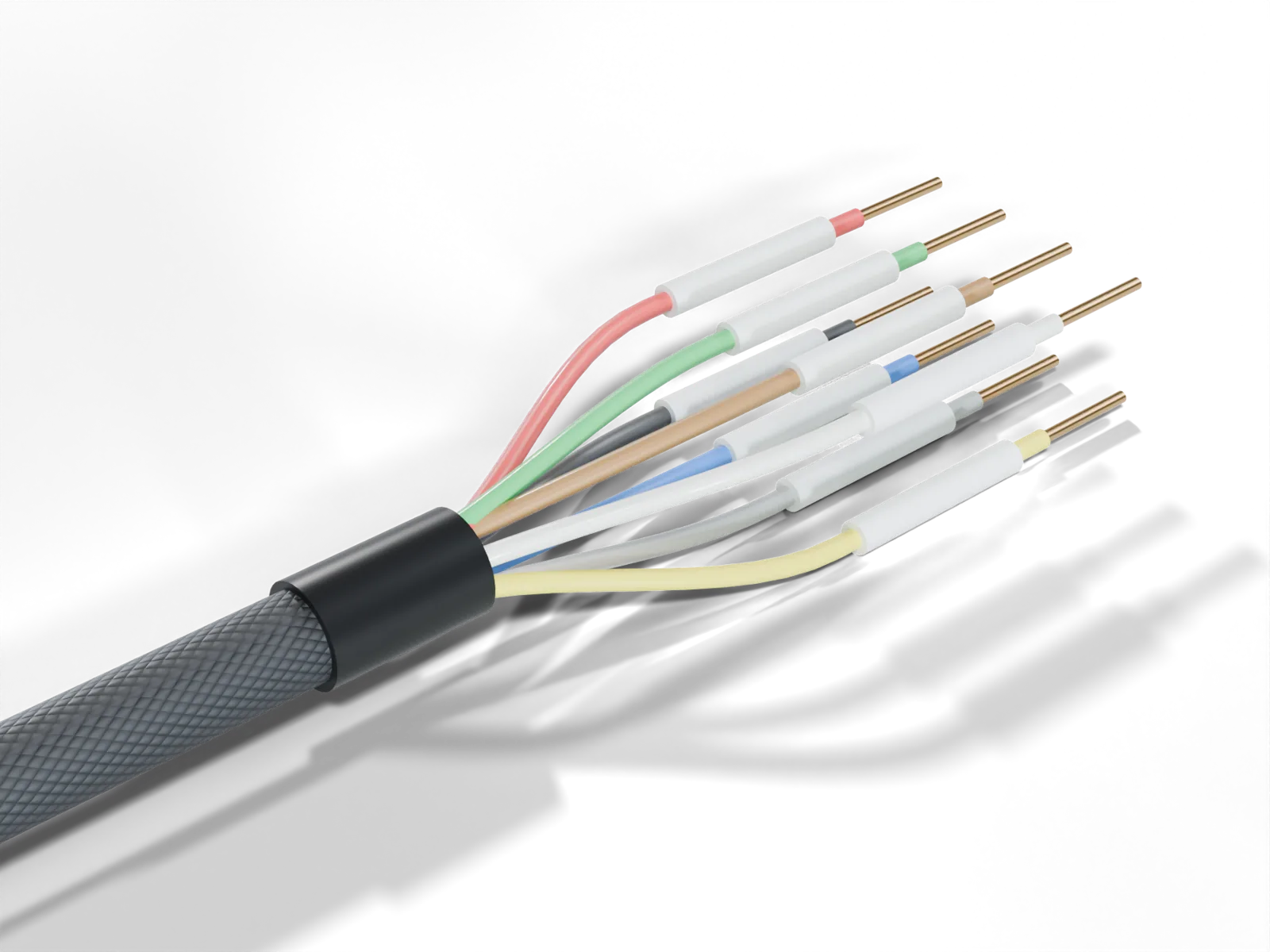
Harness C has IN1–IN6 conditioned 0–5 V inputs, +5V OUT and sensor GND. Configure each input for its actual analog sensor or level/switch function. See the pin map.
How the inputs behave
- Voltage compatibility: inputs accept conditioned 0–5 V signals. Never connect 12 V, a coil/ignition signal or a negative-going signal directly. Input clamps are not permission to miswire; an overvoltage or transient can damage the controller or the connected sensor.
- Zero is a reading, not a diagnosis: an open input tends toward 0 V, but 0 V may also be a valid sensor value. A zero reading, freshness flag or app label does not prove a wire is intact. Check the sensor's documented failure voltages and test the chosen fault response.
- Calibration: analog inputs use the voltage/value calibration you set. Presets are starting points; enter the correct units, range and calibration from the actual sensor or conditioner.
- Level/switch mode: the default threshold is 2.5 V. Threshold, hysteresis and reverse logic are configurable. Verify both states and the disconnected-wire state before using a switch as an arm or safety input.
- Sensor supply: J8 pin 4 supplies 5 V for compatible sensors and shares the board's 5 V rail. Keep the combined external sensor draw below the hardware guide's approximately 500 mA allowance, with margin. It is not a pump, lamp, relay or wideband-heater supply.
- Sensor reference: use J8 pin 8 sensor GND as the signal reference. Do not use it as a load return. Before sharing an existing sensor signal, verify its output type, voltage, grounding and permitted additional loading with the device maker.
- Pulse and specialised sensors: these multiplexed analog inputs are not dedicated frequency counters. Frequency-output flex-fuel or flow sensors, crank/cam signals and raw thermocouples need a compatible conditioner or a supported, defined CAN signal. Selecting a preset does not add the missing interface.
- Freshness: input conversion, CAN/OBD acquisition and phone display rates differ. Use the actual source age and configured stale limits; a faster display or recording setting does not make the sensor update faster.
Three-wire 0–5 V sensors (pressure, conditioned ethanol, external boost)
- Power: use +5V OUT only for a sensor rated for a 5 V supply and within the combined supply allowance. Other devices need their maker's specified supply.
- Ground: connect the compatible sensor signal reference to Harness C GND. Check any separately powered controller's grounding requirements.
- Signal: connect its documented 0–5 V output to a free IN1–IN6. Do not connect an unverified wire from an existing gauge or ECU.
- Configure: select the input, give it a useful name and units, and set its calibration. Verify at known values rather than assuming a preset matches.
A wideband controller's compatible analog or CAN output can provide measured mixture; the raw oxygen sensor cannot connect directly. A frequency-output ethanol sensor needs conversion before an analog input can read it.
Two-wire temperature senders
A resistive sender needs a correctly selected pull-up or signal conditioner. The resistor example produces a voltage, but most temperature senders are nonlinear: a two-point linear calibration is only an approximation over a checked range. Prefer a compatible conditioned output where accurate temperature limits are needed. Do not connect a raw thermocouple directly.
Level switches and arm switches
A dry switch may connect +5V OUT to an input as shown in the switch diagram. Select the threshold, hysteresis and polarity to match the actual switch. An open switch and broken wire can produce the same voltage. Test full/empty or armed/disarmed states and the disconnected state; then explicitly configure the corresponding controller gate or automation.
Routing sensor wiring
- Keep sensor wiring away from ignition components, alternator cables and switched load wiring. Cross those runs at right angles where practical.
- Use suitable twisted or shielded wiring for noisy runs, following the sensor maker's grounding guidance. Never carry load current through a signal shield.
- Use properly supported, sealed joints and 20 AWG or heavier extensions, accounting for voltage drop and signal loading.
Choosing existing vehicle or accessory data
You can select supported OBD parameters, defined CAN1/CAN2 signals or calibrated analog inputs instead of adding duplicate sensors. CAN1 is normally the vehicle/OBD bus; CAN2 can connect compatible accessories. Start CAN2 in listen-only mode with the correct bitrate and termination. Give decoded signals the correct bus, standard/extended ID, bit layout, scaling and units; enable polling or custom transmission only when the receiving device's protocol is known. This does not automatically decode every vehicle or accessory.
11. Output wiring
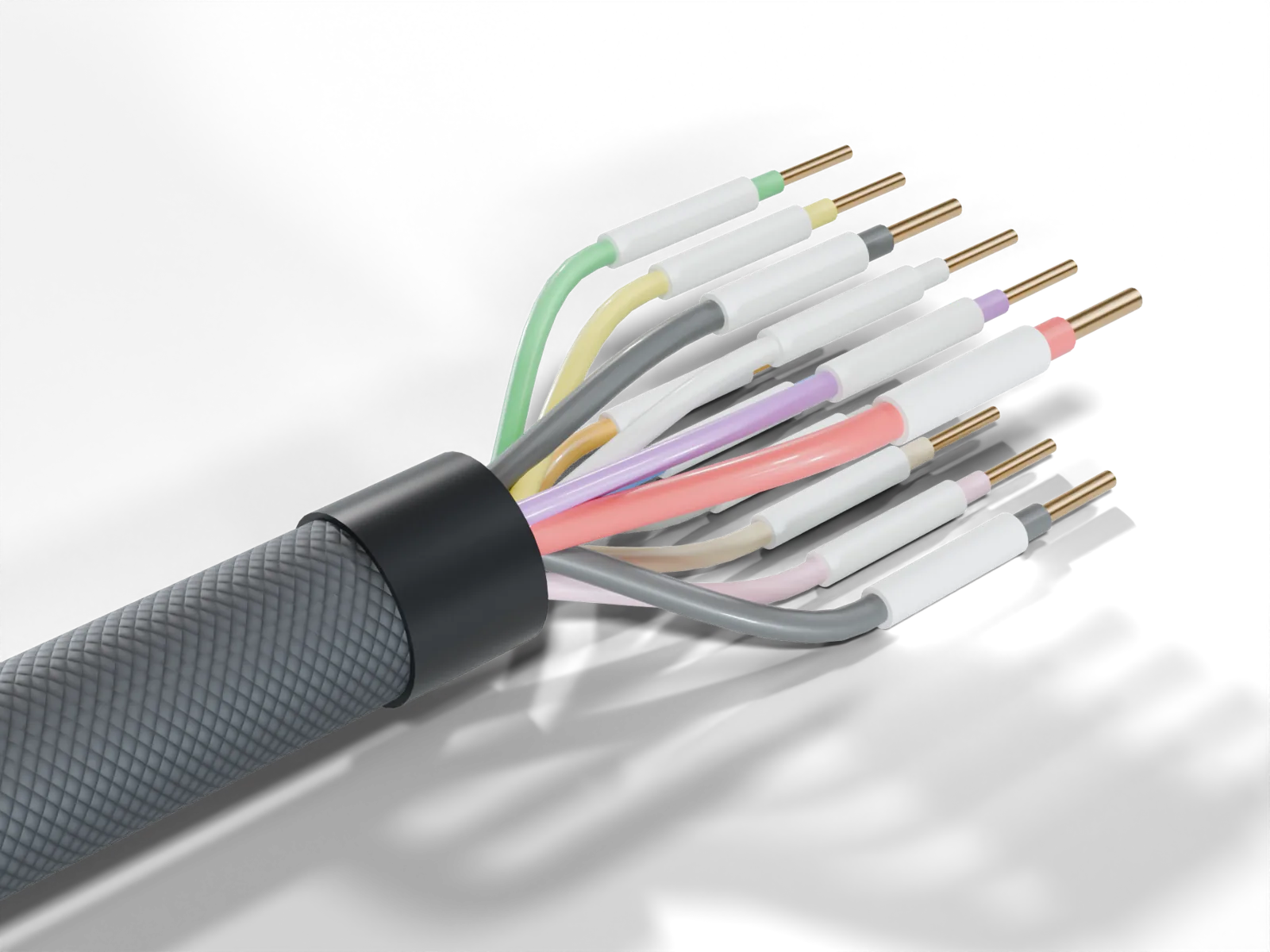
Four high-side outputs and two low-side AUX outputs: OUT1–4 switch the positive supply to a compatible load; AUX1–2 switch a compatible load's negative side to ground. All six support on/off or PWM control when their electrical interface and assigned function support it.
| Output | J6 pin | Connection | Electrical boundary |
|---|---|---|---|
| OUT1 | 12 | OUT → load positive; load negative → power ground | Four high-side outputs designed for 10 A each, sharing the dedicated 30 A fused path. Match the load and validate the installed assembly. |
| OUT2 | 11 | Same high-side wiring | |
| OUT3 | 10 | Same high-side wiring | |
| OUT4 | 9 | Same high-side wiring | |
| AUX1 | 2 | Fused +12 V → compatible load → AUX1 | Nominal 1 A-class low-side sinks. Common ground required; not isolated contacts or 12 V outputs. |
| AUX2 | 8 | Fused +12 V → compatible load → AUX2 |
OUT1–4 have built-in high-side PWM power drivers designed for 10 A each, sharing a 30 A fused power path. Compatible loads connect directly; no extra driver is needed within their electrical requirements. Check running and start/stall current, wiring, connectors, fuse protection, cooling and enclosure temperature for the actual installation; reduce the load or use a suitable external driver where needed. Do not plan four 10 A loads at once.
Rules for outputs
- Dedicated feed: use the correct fused J6 feed for OUT1–4 and observe the LS Rev A limitation in section 6.
- Shared output budget: controllers and automations share six physical channels. A boost solenoid uses one, a WMI pump or external permit uses one, each dry nitrous stage uses one and each wet stage uses two. Retard requests and EBC trigger wires consume channels too. Three wet stages consume all six, including the two small AUX sinks; that is not six heavy-load drivers.
- Individual fuses: select protection for the actual wire, load and driver. Fuse numbers in diagrams are illustrative or path limits; they do not qualify continuous operation. Never parallel outputs to increase capacity.
- External drivers: use an appropriately rated relay/driver for loads beyond a channel's validated capability. Mechanical relays are on/off only. A solid-state driver must explicitly support the load, control polarity and intended PWM frequency.
- High-side suppression: for a compatible coil between OUT and ground, a flyback diode's stripe/cathode goes to OUT (load positive), and its anode to load ground.
- Low-side suppression: for a compatible coil between fused +12 V and AUX, the stripe/cathode goes to +12 V and the anode to AUX (coil negative). Do not copy the high-side wiring onto AUX.
- Suppression compatibility: follow the load maker's polarity, release-time and suppression requirements. Check existing integral diodes and select adequate transient ratings. An arbitrary diode is not a universal solution for a motor with electronics, a fast valve or an external controller.
- Power sequencing: AUX is referenced to FusionDrive ground and its clamp rail. Verify the external supply, common ground and on/off sequence; do not assume isolation when FusionDrive is unpowered.
- Ignition and temperature: configure and test key-off behaviour. Mount for heat transfer and validate sustained temperature and voltage drop. The app reports commanded duty, not measured output current, voltage or delivered flow.
Common load examples
- Boost solenoid
- Use a compatible OUT channel as in the high-side example, or a validated small LS-compatible solenoid wired from fused +12 V to AUX. Match frequency, duty limits and plumbing to the actual valve. A preset is a starting point.
- Water/methanol
- Directly control a compatible pump through a suitable output/driver, or retain an external controller and use supported monitoring or a compatible binary permit interface. Add real flow, pressure or level measurements where protection requires them; pump duty does not prove injection.
- Fans and fuel pumps
- Check start/stall current and PWM compatibility. A minimum duty does not guarantee flow, starting, cooling or safe fuel pressure. Use a suitable external driver and independent safeguards where required.
- Nitrous
- Assign dry/wet stage outputs and independent fuel curves within the shared channel budget. Install and configure required arm, RPM, throttle, pressure or mixture sources. A selected gate is useful only with a valid, correctly calibrated signal.
- Relay or external EBC
- AUX may sink a compatible coil or documented ground-trigger input. Follow the LS relay diagram or external EBC example; do not inject AUX power into another controller.
FusionDrive can retain compatible existing sensors, gauges and controllers, or directly control compatible loads. It is not an ECU reflash tool, a universal proprietary-controller interface or a replacement for every external controller.
12. First power-up and pairing
- Final visual check. Every crimp heat-shrunk, no bare copper, every plug latched, harnesses supported, boost hose on, fuses fitted in each load, battery feed fused.
- Reconnect the battery negative terminal.
- Turn the ignition on (engine off). If Harness A is plugged in the controller already has power; ignition wakes it either way.
- Install the supported FusionDrive iPhone app. An account is optional for local setup and control. Choose local use or sign in for the online features you want; demo data is separate from the connected device.
- Pair. In the app, go to Connection and tap your controller when it appears. Each controller advertises under its serial number, which is printed on the unit. Keep the phone within a couple of metres for the first connection.
- Verify the supply and ignition. Check J6 pin 1 with a meter where OUT1–4 will be used, including voltage drop under a safe test load. Verify IGN changes with the key. On LS Rev A, a feed indicator can be falsely asserted without the dedicated feed; never use it as the only check.
- Check the vehicle voltage. Measure the actual supply against the controller and vehicle specifications. A displayed OBD voltage is a vehicle-reported value, not a measurement at every output or proof of wiring quality.
- Check for updates. Follow the app's supported Bluetooth or Wi-Fi update workflow. Keep power stable, keep loads in a safe state and wait for the final completion/restart. Do not interrupt an update or start one while driving.
13. Verifying inputs and outputs
Commission stationary, initially with hazardous loads isolated and the engine off. Use a safe test load where practical before connecting fuel, boost or nitrous equipment.
Vehicle data
- Select supported OBD parameters and confirm the ECU actually replies. Compare RPM and other values with a reference; unavailable parameters are not zero readings.
- For accessories, verify bus, bitrate, termination, frame identity, decoding, units and acquisition age. Keep transmission disabled until the receiving protocol is confirmed.
Boost sensor
- Verify the selected feedback source. The onboard gauge sensor should be near zero with its pressure port at atmosphere.
- Compare running pressure with a reference appropriate to the engine; idle vacuum is not universal. Check hose integrity before enabling control.
Sensors
- Check each configured input's raw voltage, units, calibration and known values. Test both switch states and a disconnected input; zero alone is not proof of sensor failure.
- Verify the configured stale/fault response by removing or stopping the selected source safely. Restore the source and confirm the intended recovery behaviour.
Outputs
- Confirm OUT versus AUX polarity before energising. Use the app's manual controls only within the load maker's safe operating conditions and confirm the correct physical device responds.
- Do not run a pump dry or open a nitrous bottle for an electrical test. Isolate hazardous delivery and verify interlocks before any live commissioning.
- Measure supply/ground voltage drop and load current with suitable equipment. App duty, an LED or a connected phone does not prove electrical delivery or thermal safety. See troubleshooting for unexpected operation.
Sleep and wake
- Test key-off output behaviour while awake as well as eventual sleep. Check the actual sleep settings, CAN activity and parked-current draw.
- Test ignition/CAN wake and reconnection on the installed vehicle without relying on a fixed delay.
Operation without the phone
Wait for each configuration save acknowledgement, then disconnect the phone and power-cycle the controller with loads made safe. Verify the saved configuration and intended local operation. ESP configuration runs locally; a phone connection is needed to collect phone logs. Manual duty and WMI prime do not resume as an unattended demand, and nitrous boots disabled; any configured local re-enable/arm path must be explicitly reviewed and tested.
14. Final checklist
- Controller secured for cooling and environmental protection; connector clearance and strain relief checked
- OBD connection and supported vehicle protocol checked; harness away from pedals
- Dedicated fused J6 pin 1 feed verified for OUT1–4, with LS Rev A feed-indicator limitation understood
- Both J6 ground leads connected; IGN on a verified switched circuit and configured key-off behaviour tested
- OUT positive-side versus AUX negative-side wiring verified; individual fuses and compatible suppression fitted
- Actual running/start current, cable voltage drop, thermal conditions and shared output allocation checked
- Sensor supply compatibility, combined 5 V draw, signal reference and calibrated 0–5 V range checked
- No raw 12 V, frequency or ignition signals on analog inputs; required conditioners installed
- Boost reference suitable, existing critical lines undisturbed, hose secure with no liquid traps
- All plugs latched and supported; unused leads insulated
- App paired in real-device mode; all intended configuration saves acknowledged
- Physical output response, switch polarity, source loss and fault recovery tested safely
- Sleep/wake, parked draw and saved phone-disconnected operation checked
- Boost, water/meth and nitrous limits and independent safeguards reviewed before live operation
Next: set up your sensors, outputs, boost profiles and automations in the app manual.
Ignition and OBD vehicle activity
A dedicated ignition wire is optional when fresh running-engine OBD data supplies the required activity evidence. You can use dedicated IGN, OBD, or both. A connected cable alone is not running evidence; verify the vehicle supplies fresh supported data and that shutdown behavior matches your installation. Dedicated output power feeds and grounds remain required for the loads they supply.