
FusionDrive Docs
Keep the equipment you love, or bring its control into FusionDrive. Find the connection, understand what FD can do, and follow the wiring and setup guide for your build.
Keep what works.
Keep your gauges and controllers. Add compatible measurements, requests and automations.
Keep your equipment 02 / FD CONTROLBring it into FD.
Let FD drive compatible pumps, valves and solenoids. Configure and log the system in one place.
Use FD controlA guide for your own build.
0–5 V sensors, switches, CAN2, PWM loads and remote inputs. Twelve wiring diagrams, pinouts, app setup and checks for custom or unlisted hardware.
What can FusionDrive do with your mods?
Choose what stays and what FD takes over. Monitoring a controller, requesting a function and replacing its control are different connections.
| Your setup | Keep your equipment | Bring control into FD | Limits & exceptions |
|---|---|---|---|
| Boost controllers | Keep your controller, display and tune. Request supported groups or scramble modes and log boost with the rest of your setup. Keep guide PDF | Direct PWM to a compatible boost solenoid. Manual duty, open-loop or closed-loop PID, profiles, tables and protection settings. FD setup guide PDF | A remote request needs a documented input. Stepper valves need their own drive interface; the original tune does not import. |
| Water / methanol | Keep native pump control and safeguards. Add level, pressure, flow or available status. Add permission or pause control where supported. Keep guide PDF | Direct control of a compatible pump: boost-based progression, duty tables, smoothing and priming. Configure protection using installed sensors. FD setup guide PDF | Some controllers allow monitoring only. Actual delivery needs a measurement; injector-tracking and fast-valve strategies do not automatically transfer. |
| Nitrous systems | Retain progressive control, WOT and RPM logic. Add a supported permission interface and overlay activity with pressures, lambda and vehicle data. Keep guide PDF | Compatible solenoids on FD OUT, with timed or RPM progression, profiles, separate wet-fuel curves and configured sensor gates. FD setup guide PDF | Each wet stage uses separate fuel and nitrous outputs. Dry-system enrichment and actual ignition retard still need suitable ECU or ignition hardware. |
| Sensors & gauges | Keep the instrument and connect a compatible logging output or documented CAN signal. Add FD display, logging and automations. Keep guide PDF | Connect a compatible linear 0–5 V sender directly, or use FD as the display for a switch or decoded CAN measurement. FD setup guide PDF | Wideband, thermocouple and other conditioning electronics may need to stay. A raw sensor tap must not disturb the original reading. |
| Pumps, fans & custom mods | Add a documented request or monitoring signal to an existing accessory. Use rules for cooling, spray, warnings or permission. Keep guide PDF | Compatible 12 V loads connect directly to OUT for on/off or PWM. AUX handles suitable ground requests and smaller loads. FD setup guide PDF | Check current, start/stall demand and waveform. Extra drivers are only for capacity/interface exceptions. Retain required independent protection. |
| CAN accessories | Keep the accessory electronics. Bring supported classic-CAN broadcasts into CAN2 for display, logging and local rules. Keep guide PDF | FD can take over the display and logging role. Decode supported integer signals manually or with a supported DBC. FD setup guide PDF | CAN2 does not automatically identify arbitrary data or provide general request/response polling. Keep vehicle CAN1 separate. |
Four high-side PWM outputs designed for 10 A per OUT, sharing a 30 A fused supply. Two separate low-side AUX outputs are 1 A class. Compatible loads connect directly; add a driver only when capacity or the electrical interface requires it.
Match running and start/stall current, PWM, wiring and simultaneous demand. Design ratings still require final assembled-board validation. Direct wiring PDF
One view of the whole setup.
Overlay available OBD, sensor and CAN measurements with controller requests and automation events. Log actual pressure or flow alongside commands to see what happened and why.
Logging guide →Your setup runs on FD.
Saved inputs, controllers and automations run on the device without the phone connected. Phone logs and Cloud backup are separate from local control.
Automation guide →Installation guides for your setup
Choose a route first, then check your exact model and harness revision. The integration overview (PDF) helps you plan the installation.
01 Keep your equipment
- Keep your boost controllerModel-specific setpoint, scramble and monitoring connections.Open guide PDF
- Keep your water/meth controllerPreserve the existing system. Add evidence and supported permission.Open guide PDF
- Keep your nitrous controllerAdditional permission, native safeguards and useful tuner logs.Open guide PDF
- Keep your sensors and gaugesBring documented analog and CAN measurements into one place.Open guide PDF
02 Bring control into FD
- Bring boost control into FDCompatible solenoids, control modes, source selection and setup.Open guide PDF
- Bring water/meth control into FDDrive a compatible pump directly, map its control and measure delivery.Open guide PDF
- Bring nitrous control into FDDirect solenoid control, stages, fuel curves and measured gates.Open guide PDF
- Replace the display. Keep the measurement.Direct sensors, hidden controllers and the electronics that still matter.Open guide PDF
Find your exact accessory
48 product manuals with identification images, wiring diagrams, setup and a keep-or-replace assessment. Your product does not need to be listed: use the universal guide for a compatible custom connection.
48 product manuals
- Boost
APEXi AVC-R 420-A004/A005
Scramble request only; a conventional-solenoid conversion is a separate FD setup.
- Boost
GReddy Profec OLED + Profec MAP 15500215
MAP remote input needs a positive request; a bare AUX ground sink cannot supply it.
- Boost
GFB G-Force III
Model-specific group and scramble requests; confirm the controller’s actual selected mode.
- Boost
AEM Tru-BoostX 30-0352
Scramble request, not arbitrary group control. Check the solenoid before transferring control.
- Boost
Turbosmart eBoost2
SSB up/down requests; the FD group indication is estimated rather than reported by the controller.
- Boost
Turbosmart eBoost3
SSB up/down requests; the FD group indication is estimated rather than reported by the controller.
- Water / methanol
Snow VC-30 · 20010 / 212 · 2019-and-later harness
Monitor with independent measurements; no documented native remote-enable input. FD pump control is a separate setup.
- Water / methanol
Snow VC-50 · 210 / 210-BRD · New Style
Monitor with independent measurements; no documented native remote-enable input. FD pump control is a separate setup.
- Water / methanol
Snow Stage 3 · 310 / 310-BRD · EFI controller
Monitor with independent measurements; no documented native remote-enable input. FD pump control is a separate setup.
- Water / methanol
Snow Stage 3 DI · 320 / 320-BRD · FRP controller
Monitor with independent measurements; no documented native remote-enable input. FD pump control is a separate setup.
- Water / methanol
AEM 30-3300 · V2 internal-MAP kit · documented 12-way harness
Documented arm/permission route; preserve the engine-load fallback when injection is unavailable.
- Water / methanol
AEM 30-3305 · V2 multi-input controller · documented 12-way harness
Documented arm/permission route; preserve the engine-load fallback when injection is unavailable.
- Nitrous
NOS Mini 15974NOS
Model-specific additional permission, or separately configured FD stages with matching loads and sensor gates.
- Nitrous
NOS Mini 25974NOS
Model-specific additional permission, or separately configured FD stages with matching loads and sensor gates.
- Nitrous
NOS Launcher 15975NOS
Model-specific additional permission, or separately configured FD stages with matching loads and sensor gates.
- Nitrous
Nitrous Express Maximizer 5
Secondary-input behavior must be established before using it as an FD permission path.
- Nitrous
Nitrous Express Maximizer 6 · 16011
Model-specific additional permission, or separately configured FD stages with matching loads and sensor gates.
- Nitrous
Nitrous Outlet ProMax · 00-61002
Model-specific permission and stage assessment. Labelled CAN pins are not functional in the cited manual.
- Sensors, gauges & CAN
AEM 30-0300 X-Series - Bosch LSU4.9
Use the documented analogue or CAN measurement. Retain required wideband, temperature or frequency-conversion electronics.
- Sensors, gauges & CAN
AEM 30-0301 X-Series 100 psi pressure gauge
Keep its logging output, or assess the exact sender before removing the gauge electronics.
- Sensors, gauges & CAN
Innovate LC-2 wideband controller
Use the documented analogue or CAN measurement. Retain required wideband, temperature or frequency-conversion electronics.
- Sensors, gauges & CAN
Innovate MTX-L PLUS wideband gauge
Use the documented analogue or CAN measurement. Retain required wideband, temperature or frequency-conversion electronics.
- Sensors, gauges & CAN
AEM 30-2310 inline wideband controller
Use the documented analogue or CAN measurement. Retain required wideband, temperature or frequency-conversion electronics.
- Sensors, gauges & CAN
AEM 30-2130-150 stainless pressure sensor
A dedicated linear pressure sensor can connect directly with the correct supply and calibration.
- Boost
HKS EVC7 · 45003-AK013
Keep native control and monitor separately. The HKS stepper valve cannot connect directly to FD OUT.
- Boost
HKS EVC-S2 · 45003-AK015
No documented native remote permit in the reviewed guide; replacement is a separate control design.
- Boost
GFB G-Force II · 3004
Model-specific group and scramble requests; confirm the controller’s actual selected mode.
- Boost
GReddy PRofec B-spec II
Keep native control and monitor separately; no documented remote permit in the reviewed guide.
- Water / methanol
Aquamist HFS3 · v3.2
Retain specialized metering. Injector tracking and fast-valve control do not transfer to FD’s boost-based pump strategy.
- Water / methanol
Aquamist HFS4 · v3.2
Retain specialized metering. Injector tracking and fast-valve control do not transfer to FD’s boost-based pump strategy.
- Water / methanol
Coolingmist CMGS System X · FSB/FCB
Independent measurements; identify the exact FSB/FCB revision before planning control.
- Water / methanol
Coolingmist CoolBoost Stage 2 V2 · boost based
A documented pause input; releasing pause can resume injection. Preserve native protection.
- Sensors, gauges & CAN
AEM 30-0310 X-Series inline wideband — Bosch LSU4.9
Use the documented analogue or CAN measurement. Retain required wideband, temperature or frequency-conversion electronics.
- Sensors, gauges & CAN
AEM 30-0334 X-Series OBDII wideband gauge — Bosch LSU4.9
Use its separate analog output. The OBD-emulation interface is not the standard AEMnet CAN2 connection; keep the wideband electronics.
- Sensors, gauges & CAN
ECUmaster Lambda to CAN revision 2 — Bosch LSU4.9
Use the documented analogue or CAN measurement. Retain required wideband, temperature or frequency-conversion electronics.
- Sensors, gauges & CAN
14point7 Spartan 3 v2 wideband controller
Use the documented analogue or CAN measurement. Retain required wideband, temperature or frequency-conversion electronics.
- Sensors, gauges & CAN
Zeitronix ZT-3 CAN wideband controller
Use the documented analogue or CAN measurement. Retain required wideband, temperature or frequency-conversion electronics.
- Sensors, gauges & CAN
Zeitronix ECA-2 CAN ethanol-content and fuel-temperature interface
Use the documented analogue or CAN measurement. Retain required wideband, temperature or frequency-conversion electronics.
- Sensors, gauges & CAN
Zeitronix KT-4 four-channel K-type thermocouple amplifier
Use the documented analogue or CAN measurement. Retain required wideband, temperature or frequency-conversion electronics.
- Sensors, gauges & CAN
ECUmaster Wheel Speed to CAN — firmware 16.0 or later
Use the documented analogue or CAN measurement. Retain required wideband, temperature or frequency-conversion electronics.
- Sensors, gauges & CAN
AEM 30-0302 X-Series fluid temperature gauge
Use the documented analogue or CAN measurement. Retain required wideband, temperature or frequency-conversion electronics.
- Sensors, gauges & CAN
AEM 30-0305 X-Series EGT gauge
Use the documented analogue or CAN measurement. Retain required wideband, temperature or frequency-conversion electronics.
- Sensors, gauges & CAN
AEM 30-0307 X-Series 150 psi pressure gauge
Keep the gauge’s documented output, or match the exact pressure-sender transfer for direct use.
- Sensors, gauges & CAN
AEM 30-2014 air-temperature sensor
Raw temperature resistance needs matching conversion or a compatible replacement transmitter.
- Sensors, gauges & CAN
AEM 30-2200 flex-fuel content sensor
Frequency output needs a compatible conditioner or CAN interface; FD IN is not a pulse counter.
- Sensors, gauges & CAN
Innovate MTX-D 39040 ethanol and fuel-temperature gauge
Use the documented analogue or CAN measurement. Retain required wideband, temperature or frequency-conversion electronics.
- Sensors, gauges & CAN
Innovate MTX-D 39130 oil-pressure and temperature gauge
Use the documented analogue or CAN measurement. Retain required wideband, temperature or frequency-conversion electronics.
- Sensors, gauges & CAN
Derale 16795 PWM electric fan controller
Retain the controller’s fan power stage where required; direct FD drive depends on actual fan current and waveform.
No matching product manual. Try another name or use the universal connection guide.
Prefer to browse a PDF? Open the illustrated catalogue PDF
Core guides
Installation guide
Choosing a location, mounting, power and ground, the boost hose, plugging in the harnesses, sensor and output wiring, first power-up, and a final checklist.
Read the guide →Wiring & pinouts
Pin tables for all three harnesses, connector face diagrams, and typical wiring diagrams for sensors, pumps, relays, solenoids, water/meth and nitrous.
Open the reference →Technical specifications
Electrical, inputs, outputs, boost sensor, CAN/OBD, connectivity, environmental and mechanical ratings, harness lengths and app requirements.
See the numbers →Troubleshooting
No power, won't pair, OBD not detected, sensor reads wrong, output won't switch, boost reads flat, unexpected sleep, update fails, and how to send a support report.
Find the fix →App manual
The iPhone app and CarPlay: Dashboard, Sensors, Controls, Boost, water/meth & nitrous, CAN & OBD, Automations, Logging, Intelligence, Cloud and Settings.
Open the manual →Quick start
Already mounted and plugged in? Go straight to first power-up, pairing with the app, and checking each input and output.
First power-up →Downloads
The Owner’s Manual combines the core installation, wiring, specifications, troubleshooting and app guides. The integration and product manuals above are separate PDFs. Save the guides for your installation or share them with your installer.
- PDFFusionDrive Owner's ManualCore guides in one document · 6.3 MBDownload →
- PDFInstallation GuideMounting, power, boost hose, harnesses, first power-up · 2.5 MBDownload →
- PDFWiring & PinoutsEvery pin, wire colour and wiring diagram · 2.3 MBDownload →
- PDFTechnical SpecificationsRatings, ranges and limits · 1.4 MBDownload →
- PDFTroubleshootingSymptom by symptom, with the fix · 865 KBDownload →
- PDFApp ManualThe iPhone app and CarPlay, every screen · 3.2 MBDownload →
What's in the box
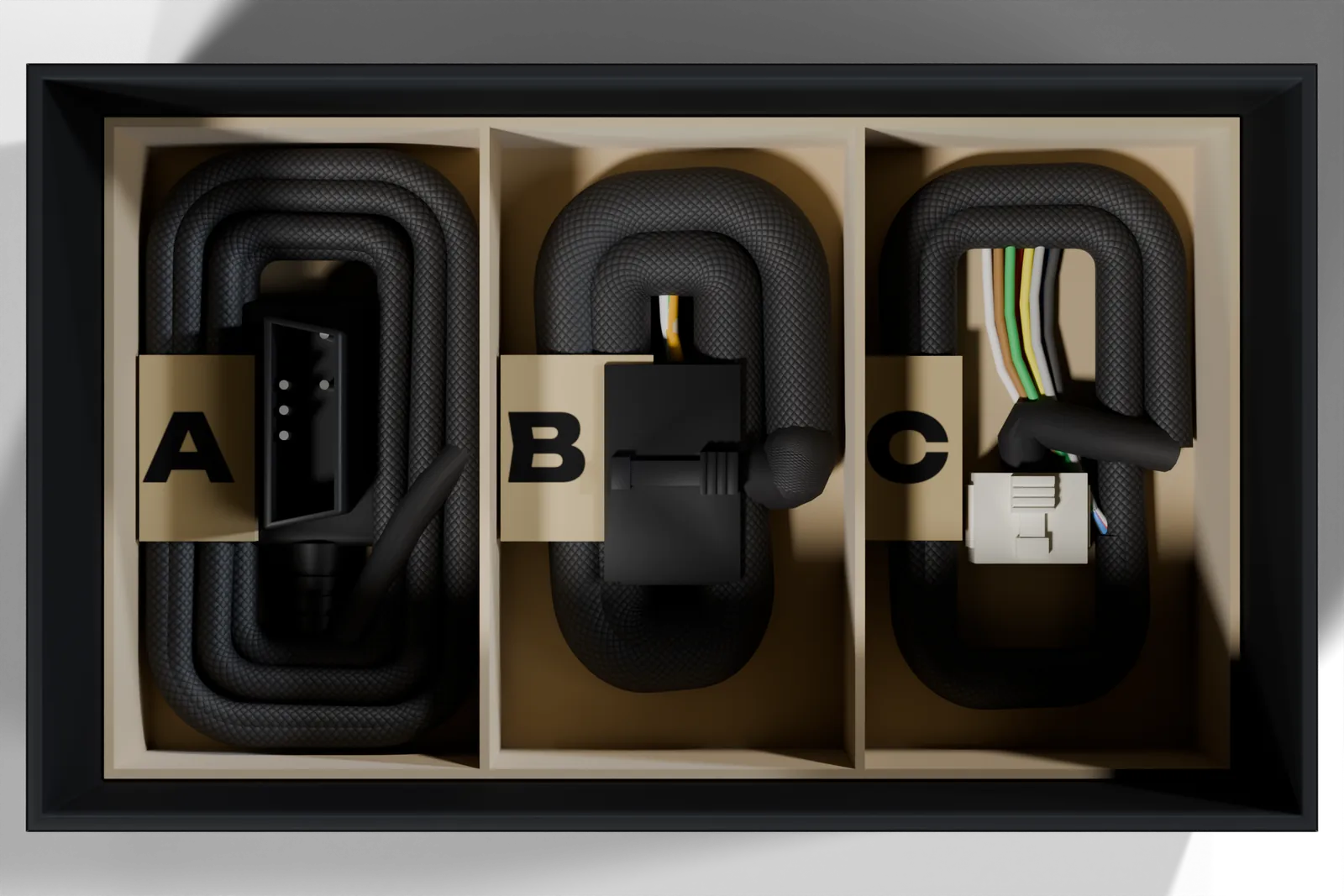
- FusionDrive controller with steel base plate and the boost hose barb on the port face, in a printed sleeve showing the connector legend
- Harness A — OBD. 1.5 m, plugs into the vehicle's diagnostic socket. Carries power and vehicle data.
- Harness B — Power & outputs. 0.5 m, twelve labelled leads: battery feed, two grounds, ignition sense, a second CAN pair, and the six outputs.
- Harness C — Sensors. 0.5 m, eight labelled leads: six sensor inputs, a 5 V sensor supply and a sensor ground.
- Quick start card. Six steps on the front; every harness lead with its label and colour on the back.
The boost hose, T-piece, mounting bolts, fuse holder and battery-feed wire are not included: they depend on your vehicle. The installation guide lists what to buy.
FusionDrive at a glance
| Power | 12 V vehicle supply (9–16 V). A dedicated fused feed is required for high-current loads; 30 A is the shared feed fuse specification, not a verified continuous-output rating. IGN is a firmware sense input. |
|---|---|
| Vehicle data | CAN1 for supported OBD-II over CAN data and configured broadcasts; CAN2 for compatible accessories with known signal definitions. Available data varies by vehicle and device. |
| Sensor inputs | 6 conditioned 0–5 V analogue inputs for compatible sensor outputs, plus a 5 V supply and sensor ground. Switches need suitable bias; pulse/frequency signals need an external interface. |
| Outputs | 4 integrated high-side PWM power outputs designed for 10 A each, sharing a 30 A fused feed; plus 2 low-side AUX outputs (1 A class). Compatible loads connect directly. Confirm the actual load, wiring and thermal limits before use. |
| Boost sensor | Built in, vacuum to 60 psi, 2 mm hose barb on the port face. |
| Phone | iPhone app over Bluetooth; CarPlay; Wi-Fi for firmware updates. iOS 18 or later. |
| Size | Body 146 × 98 × 34 mm on a steel base plate; four M6 mounting slots on 160 × 78 mm centres. |
Full details in the technical specifications.
Safety summary
FusionDrive switches real current in a vehicle. Please read these before you start, and read the fuller warnings in each guide.
The battery feed must have a 30 A fuse within 300 mm of the battery. Every device on an output needs its own fuse, sized for the device and never more than the output's rating. Disconnect the battery negative before making battery connections.
Sensor inputs accept 0–5 V only; 12 V on an input can damage the controller. OUT1–4 share a 30 A fused path and AUX1/2 are nominal 1 A-class low-side sinks; continuous capability depends on the assembled board, load, wiring and thermal validation. Nitrous and boost changes affect engine safety: set failsafes before you use them.
Bolt the base plate to a flat metal surface, away from exhaust and water, and ground both GND leads to bare chassis metal. The plate spreads heat; connect both power-ground leads as specified. Do not rely on the mounting plate as the electrical return.
Do not use the phone while driving. Configure and tune with the vehicle stationary, or with a passenger operating the app. Local laws on emissions and vehicle modification apply to whatever you connect to FusionDrive.
Getting help
Start with troubleshooting. If that doesn't solve it, send a support report from the app (More → Settings → Device & firmware → Report an Issue); it attaches the controller's log so we can see what it saw. Write to [email protected] or use the contact form.