
FusionDrive Intelligence
Understand your car and connected modifications in more depth. Intelligence brings together health indicators, changing trends, recorded warning signs and gaps in the data. Optional Cloud AI explains observations, possible causes and checks that can help you and your tuner decide where to focus. Greater confidence comes from better evidence; it is not a guarantee of failure prediction, diagnosis or extra power. Open More → Intelligence or the Dashboard’s Intelligence card.
What Intelligence is
Every time the device is connected and the engine runs for more than a minute, the app records a drive session. After each drive, Intelligence analyses the session on your phone: how consistently boost hit its target, whether fuel trims drifted, how hot things got, whether any sensor dropped out or stuck, how the outputs and automations behaved, and how the electrical system held up. The results are scored, compared with previous drives, and turned into plain-language insights. Cloud uploads follow your Intelligence sync preferences.
Use the health categories to follow boost consistency, temperature patterns, fuel corrections, sensor quality and accessory activity. A recurring protection event or deteriorating recorded trend can draw attention to a developing concern. Missing flow, pressure, mixture or source-freshness data is a gap to investigate, not evidence that the relevant system is healthy.
To assess an improvement, start with a recorded baseline and compare the relevant measurements under comparable controlled conditions. Load, gear, ambient conditions, sensor calibration and configuration all affect the result. Intelligence helps focus the investigation; the owner and tuner verify any adjustment separately.
Tiers: Off, Watch, Advise, Assist
| Tier | What it does | Cost |
|---|---|---|
| Off | New Intelligence analysis is disabled. Device telemetry, drive recording and Cloud uploads follow their separate settings. | — |
| Watch | Uses available recorded drive data to show signal/controller indicators and trends. You see the health scores and the channel health check, but not what to change. | Free |
| Advise | Adds detailed findings, recorded evidence and suggestions for what to inspect or compare. Current generated findings do not issue device-changing recommendations. | One-time purchase, licensed per device |
| Assist | Includes the detailed review available in Advise. The app retains Assist settings and a change log, but current generated analysis is read-only and does not automatically adjust the device. | One-time purchase (or upgrade from Advise), licensed per device |
The picker at the top of the Intelligence screen sets the tier you want. If your account does not hold a licence for that tier on this device, the screen shows "· wants Advise" in orange and an Unlock … on this car button that opens the store sheet. Until then the effective tier is the highest one you are licensed for.
The Intelligence screen
| Section | Contents |
|---|---|
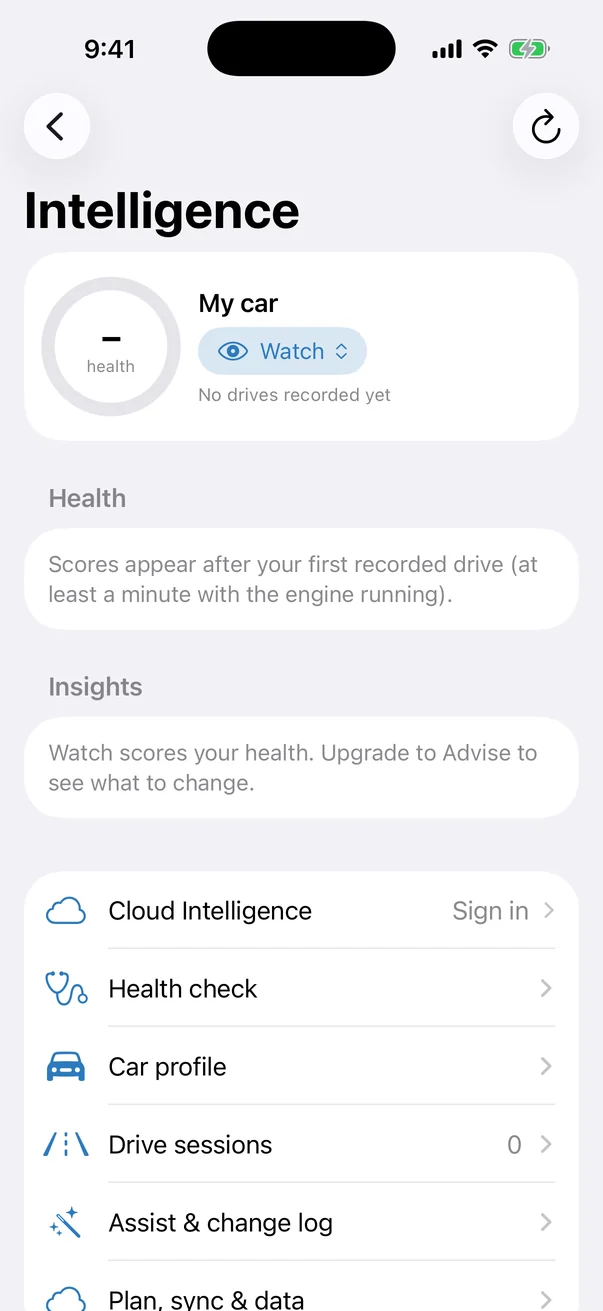
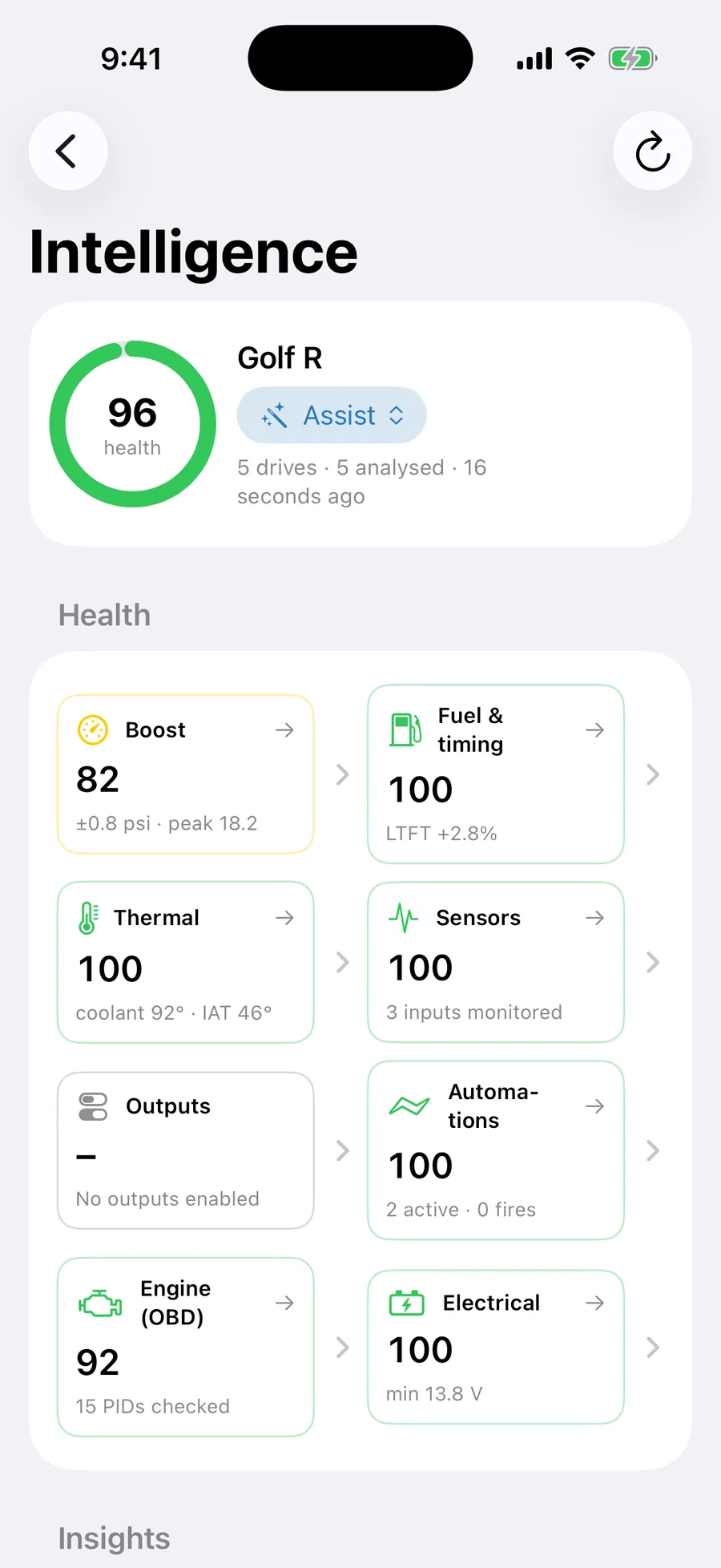
| Header | Car nickname (from the car profile), tier picker, number of drives recorded and analysed, time of the last analysis. |
| Current drive | While connected and the engine is running: elapsed time and sample count of the session being recorded. Otherwise "Connect to the device to record drives". |
| Health | Overall score and one row per category. "Scores appear after your first recorded drive (at least a minute with the engine running)." Tap a row for that category's insights. |
| Insights | Open findings ordered by severity. Current generated findings are read-only; retained action controls do not imply an available automatic fix. Toggle Show resolved & dismissed to see history. |
| Performance & potential | Context for further investigation. Current analysis withholds power, acceleration-time and safe boost-headroom estimates because these recordings do not establish them. |
| Links | Cloud Intelligence · Health check · Car profile · Drive sessions (count) · Assist & change log · Plan, sync & data. |
Health score and categories
Each category is scored 0–100 from your recent drives. Green is 85 and above, yellow 65–84, orange 40–64, red below 40. The overall score combines categories with data. These are recorded-data indicators, not a mechanical health certificate; an unmeasured system is not cleared by a high overall score. In plain words, each category considers:
| Category | What it measures | Typical findings |
|---|---|---|
| Boost | How closely actual boost tracks the target on pulls, overshoot size and frequency, spool time, overboost cuts, and whether the controller's learning is converging. | Consistent overshoot; slow to target; boost falling off at high RPM; overboost cuts. |
| Fuel & timing | Available fuel corrections and timing-advance changes, with supporting sensor data where recorded. Absolute advance is not knock retard, and fuel trim is not measured mixture or fuel pressure. | Fuel-correction drift or changed timing advance requiring matched load/RPM review; independently verify mixture and pressure. |
| Thermal | Coolant, intake air, oil and exhaust temperatures (where available) against load and ambient; heat-soak recovery; fan behaviour. | IAT climbing pull after pull; coolant creeping in traffic; fan output never switching on. |
| Sensors | Signal quality of every wired input and engine parameter: dropouts, stuck values, spikes, impossible readings, pinned inputs, chattering switches. | Oil pressure sensor flat-lining; a level switch flickering; MAP disagreeing with the onboard sensor. |
| Outputs | Whether outputs do what their role implies: fan on when hot, pump duty following boost, solenoid duty within limits; outputs that never change state. | Unused output left in Manual at 100 %; a low pump-duty command requiring actual delivery verification. |
| Automations | How often each rule fires, whether it flaps around a threshold, whether it ever fires at all. | Rule flapping (needs a dead band); rule that never fires (threshold unreachable). |
| Engine (OBD) | Engine parameters as a whole — load, RPM behaviour, fault codes, data freshness on the CAN link. | New fault codes; parameters going stale mid-drive. |
| Electrical | Control-module and battery voltage under load, dips when big outputs switch, the state of the dedicated 12 V rail, ignition sense. | Voltage dipping when the pump starts; 12 V rail missing with a pump preset configured. |
| Performance | Recorded behaviour relevant to comparing a setup; power, acceleration and safe headroom estimates are currently withheld. | Identify what measurements and controlled comparisons are needed. |
| System | Device-level items: firmware version, reboots, storage, connection drops. | Firmware update available; frequent disconnects. |
Insights
An insight is one finding. Tap it to open the detail view.
| Field | Meaning |
|---|---|
| Severity | Good nothing wrong · Notice worth knowing · Warning should be addressed · Critical stop and fix (red). |
| Category | Which health category it belongs to. |
| Confidence | Strength of support for a recorded pattern. It is not a calibrated probability of component failure, a confirmed cause or a safety verdict. Current local findings cap this indicator at 65 %. |
| Drives analysed | How many sessions the finding is based on. |
| Title, summary, detail | What was seen, why it matters, possible explanations and what to check next; inference is not a confirmed diagnosis. |
| Evidence | The numbers behind it: e.g. "Mean overshoot 2.3 psi over 7 pulls". |
| Recommendation | What to inspect, verify or compare next. Detailed guidance depends on the effective tier. Generated analysis currently removes device-changing actions. |
| Apply | The app contains guarded apply/revert controls, but current generated findings do not supply device-changing actions. Configure controllers separately using their normal settings screens. |
| Dismiss / Snooze | Hide the insight permanently, or until a later date. Dismissed insights return only if the evidence changes materially. |
| Status | New · Applied (date) · Dismissed (date) · Snoozed until (date). |
Recommendations and device control
Current Intelligence analysis is read-only. Findings can direct you to inspect wiring, check a measurement, review recorded conditions or make a controlled comparison. They do not automatically change boost, PID gains, protection thresholds, WMI, nitrous, outputs or automations.
The app contains guarded apply/revert infrastructure and related controls. Their presence does not mean the current analysis generates commands for them. Cloud AI recommendations are explanatory text, not device commands.
Assist settings and change history
Intelligence → Assist & change log. These retained settings define the limits of the app’s apply/revert framework. Current generated local findings remove device-changing actions, so they do not trigger autonomous adjustments. Treat the settings below as the controls shown in the app, not a promise of automatic tuning.
| Setting | What it does | Range / options | Default |
|---|---|---|---|
| Assist mode | Retained automatic-apply permission. Requires Assist access; current generated findings contain no device-changing actions. | On / Off | Off |
| Auto-apply in Boost / Outputs / Automations / Thermal | Category permissions in the guarded apply framework. They do not enable autonomous changes from current generated findings. | On / Off each | Boost, Outputs, Automations on; Thermal off |
| May lower boost on a critical fuel/knock warning | Retained permission for a qualifying downward target action. Current generated findings do not provide that action. | On / Off | Off |
| Owner boost step limit | Maximum owner-requested upward step accepted by the retained action framework. Current analysis does not propose boost increases. | 0.5 – 3.0 psi, step 0.5 | 1.5 psi |
| Minimum confidence to act alone | Confidence threshold in the retained framework; it does not convert a finding into a device command. | 30 – 95 %, step 5 | 60 % |
| Notify me when Assist changes something | Notification preference for the retained apply framework. | On / Off | On |
| Protected outputs | Owner-selected protected outputs. The action framework also checks assigned boost, WMI, primary nitrous/fuel and external EBC outputs for controller ownership. | Any of OUT 1–4, AUX 1–2 | None ticked |
| Boost ceiling (from Car profile) | Read-only profile ceiling used by the action framework. Current analysis supplies no boost-changing actions. | — | 20 psi |
Change log and undo
Below the guard rails is the retained history for changes previously recorded through the apply/revert framework: what changed, when, whether Assist or you did it (wand vs hand icon), and a Revert button that writes the previous value back to the device. Reverted entries are struck through. Clear log removes the history (it does not undo anything).
Car profile
Intelligence → Car profile. Tells the analysis what it is looking at. The more you fill in, the more specific the insights.
| Field | What it is for | Options / range | Default |
|---|---|---|---|
| Nickname | Shown at the top of Intelligence and CarPlay. | Free text | Empty |
| Make, Model, Year, Engine code | Identify the car; used to group you with similar builds for fleet benchmarks. | Free text / year | Empty |
| Displacement (L), Cylinders | Vehicle context for analysis and profile matching. Current power estimates are withheld. | Litres; 2 – 16 cyl | —; 4 |
| Induction | Whether boost-related analysis applies. | Single turbo · Twin turbo · Supercharged · Twin-charged · Naturally aspirated | Single turbo |
| Fuel | Fuel context. A fuel choice does not establish measured knock margin or safe boost. | 91 RON · 95 RON · 98 RON · E85 · E30 blend · Diesel · Methanol · LPG | 98 RON |
| Goal ("What you want from it") | Records your priorities: Reliability first, Balanced, Maximum power, Economy or Track day. Selecting a goal does not make current analysis issue tuning commands or establish headroom. | 5 options | Balanced |
| Boost ceiling | Owner limit used by the action framework. Choose it from independently validated engine, fuel and calibration requirements. | psi | 20 psi |
| Redline | Used for RPM-related checks. | rpm | 6500 rpm |
| Estimated power, Weight | Owner-supplied context. Current analysis does not calculate power or acceleration estimates from these fields. | kW; kg | Empty |
| Inputs (IN1–IN6) roles | What each wired sensor represents, so the analysis can cross-check it. | Not used · Boost / MAP · Oil pressure · Oil temperature · Fuel pressure · Coolant temperature · Intake air temperature · Exhaust gas temperature · Wideband AFR / lambda · WMI tank level · WMI line pressure · Nitrous pressure · Battery voltage · Other | Inferred from sensor name/preset |
| Outputs roles | What each output drives. | Unused · Boost solenoid · WMI pump · Cooling fan · Fuel pump · Nitrous solenoid · Intercooler spray · Oil cooler / pump · Lighting · Other | Inferred from output preset |
| Modifications | Free-form list ("front-mount intercooler"). | Text items | Empty |
| Notes | Anything else. | Free text | Empty |
| Restore from server | Pulls the profile saved in your FusionDrive Cloud account (after reinstalling the app, for example). | — | — |
Drive sessions
Intelligence → Drive sessions. "Drives are recorded automatically whenever the device is connected and the engine is running for more than a minute." The screen shows a Boost consistency trend chart ("Deviation from target while on boost, per drive. Lower is better."), then a list of sessions with date, duration, peak boost, distance, WOT pulls and overboost cuts. Tap a session for its full summary, the configuration that was in force (boost settings, active automations) and its samples; swipe to delete. Older sessions may say "Sample data for this drive has been pruned; the summary above is kept." Sessions share storage limits with Data Logging: full samples for the last Keep samples for logs, summaries for the rest.
Health check (channels)
Intelligence → Health check. The health check reviews available recorded channels for patterns such as dropouts, repeated or flat values, spikes, range issues and switch chatter, with selected cross-channel checks where supporting data exists. Channels are grouped (Engine, Inputs, Outputs, Boost…) with an indicator of OK, Notice, Warning or Critical; tap for the evidence and what to check. Some current labels use diagnostic shorthand. A label alone does not confirm a component fault, and OK does not assess unmeasured behaviour.
Performance & potential
Intelligence helps you identify what deserves closer measurement and comparison: changes in boost tracking, heat recovery, fuel correction, sensor availability or accessory behaviour. Use the recorded evidence with your tuner to decide what to investigate and to assess whether a separately configured change helped.
Current analysis deliberately withholds estimated power, acceleration times and safe boost headroom. It does not establish how much power a modification will add, when a component will fail, or whether more boost is safe. Those conclusions require suitable independent measurements and validation.
Cloud Intelligence
The local indicator and evidence analysis runs on your phone. Cloud Intelligence is the optional subscription that adds longer-history analysis and, when the AI service is available, evidence-based written interpretation. It brings recorded vehicle and modification behaviour into a common review; it is not a trained component-lifetime or failure-prediction model. In practice:
- Long-term drift — trends the phone cannot hold: fuel trims over a season, boost consistency over hundreds of drives.
- Intelligence brief on the web — on your device page in the web viewer, a written brief ("Your car, read by Intelligence") produced from the supported recorded evidence available to the analysis: a headline, summary, findings with evidence references, uncertainties, alternative explanations and verification steps, plus "moments worth a look" you can tap to jump into the log. Without the subscription the card shows it is locked.
- Web health check and channel trends — the channel health verdicts and their history in your browser.
- Log retention — full-resolution uploaded logs kept beyond the 30 days included with a free account.
- Fleet benchmarks — see below.
Cloud Intelligence "needs a FusionDrive Cloud account" and offers monthly or yearly terms through your Apple ID, as shown at purchase; "cancel any time in Settings → Apple ID → Subscriptions."
Fleet benchmarks and privacy
With Cloud Intelligence, the Intelligence screen shows "Fleet: N similar cars" under a category. Your car's numbers — boost consistency, overshoot, thermal recovery, trims — are compared with anonymised aggregates from cars with a similar profile (induction, displacement, fuel, goal). Benchmarks are car-agnostic: they compare behaviours, not identities, and no one can see your individual data.
With sync enabled, selected drive summaries, car-profile fields and compressed samples are uploaded against the device serial for analysis. User-entered names and notes can contain personal information; review those fields and your sharing preferences. The app does not collect location.
Plan, sync & data
Intelligence → Plan, sync & data.
| Item | What it does |
|---|---|
| Plan · Subscription | Your current tier and Cloud Intelligence status. |
| Sync to FusionDrive server | Uploads sessions and profile to your account. Shows Waiting to upload count and a Sync now button. |
| Fleet benchmark | How many similar cars your benchmarks are drawn from. |
| Drives stored / Sample data on phone | Local storage in use. "Full samples are kept for the last N drives; summaries for the last M." |
| Delete all Intelligence data | Removes every session, score and insight from the phone after confirmation. Does not delete uploaded data — use the account's delete option for that. |
Licences
From the store sheet: "Advise and Assist are one-time purchases held on your FusionDrive Cloud account. Each licence unlocks one device at a time; move it to another of your devices whenever you sell or swap a car (one move per 30 days, waived when you release the old device). Cloud Intelligence is an auto-renewing subscription covering every device on your account." You must be signed in (free) to buy or use a licence, and connected to the device to buy or move a licence for it. A purchase made before signing in "registers to your account as soon as you sign in." See FusionDrive Cloud → Licences for moving a licence between devices.
Dashboard visibility
Health / Intelligence appears on the Dashboard by default and can be hidden in its settings. Findings depend on the available, correctly configured signals and recorded evidence. A score is a summary of detected indicators, not a guarantee of component health or certain future performance.
Related
- Boost Control → Learning and overshoot tolerance — the separate device controller’s learning settings.
- Data Logging — the drives Intelligence analyses.
- FusionDrive Cloud — account, sync, subscription.
- Automations → Operators — dead bands for flapping rules.